More browsing paths
Play Frog (Falcon bootleg) (Hack) Online
Frog (Falcon bootleg)
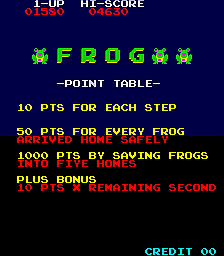
Play Frog (Falcon bootleg) online. Guide frogs across traffic and a hazardous river to their homes.
Browser play
Arcade — EmulatorJS controls
Default Player 1 keyboard mapping. Change keys in Controller Settings.
| Console button | Keyboard |
|---|---|
| ↑ / ↓ / ← / → | ↑ / ↓ / ← / → |
| RetroPad A / B / X / Y | Z / X / A / S |
| L / R | Q / E |
| Insert coin | V |
| START | Enter |
Open Controller Settings to configure your keyboard or gamepad. Touch controls are available on mobile.
How to Play Frog (Falcon bootleg)
Quick start
- Cross each traffic lane through a clear gap.
- Pause on the bank to inspect the river platforms.
- Hop onto logs or turtles before they move out of reach.
- Enter an empty home and repeat for the remaining slots.
Controls
Each four-direction input moves the frog one space. Ride logs and turtles across the river, watching diving turtles and the screen edge. Enter only an empty home.
Frog (Falcon bootleg) — About this game
Hop between safe spaces, logs and turtles, filling every destination slot to advance to tougher crossings.
Cheats
Infinite Time
1 "开启", 0, 0x83DD, 0x3C, 0, 0x83DE, 0x60Limited Invincibility (in error!)
1 "开启", 0, 0x8004, 0x00Complete Stage!
1 "开启", 0, 0x825C, 0x05Infinite Lives PL1
1 "开启", 0, 0x83E5, 0x06Infinite Lives PL2
1 "开启", 0, 0x83E6, 0x06Player verification and sources
Browser play was reviewed before this edition was published in the catalogue. The date below is the catalogue publication date, not the game’s original release date.
- Browser test and catalogue publication date
- Browsers and devices
- PC: Chrome, Edge and Firefox. Mobile: Chrome on Android and Safari on iPhone and iPad.
- Player engine and core
- EmulatorJS 4.3.0-pre · arcade
- Tested by
- rwEmulator
Sources and editorial basis
rwEmulator reviews edition metadata, release information, game manuals and first-hand browser-play notes. Available manuals are linked below; the editorial policy explains how facts are checked and corrections are handled.