More browsing paths
Play Ninja Burai Densetsu (Translation · Traditional Chinese) Online
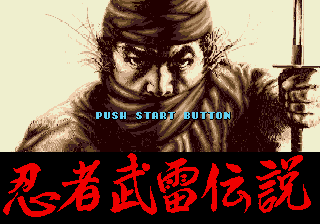
忍者武雷传说
On the line, Ninja Mines Legends are playing, training and deploying Ninjas in round maps, using terrain, moving ranges and automatic combat to defeat the enemy.
Browser play
Sega Genesis / Mega Drive — EmulatorJS controls
Default Player 1 keyboard mapping. Change keys in Controller Settings.
| Console button | Keyboard |
|---|---|
| ↑ / ↓ / ← / → | ↑ / ↓ / ← / → |
| A / B / C | S / X / Z |
| X / Y / Z | Q / A / E |
| START / MODE | Enter / V |
Open Controller Settings to configure your keyboard or gamepad. Touch controls are available on mobile.
How to Play Ninja Burai Densetsu
Quick start
The Ninja force is tasked to neutralize the enemy on the turn map. First, it is determined that each unit is moving and is good at the terrain, maintaining support for each other and approaching in multiple directions. The battle will be self-assessed, so that the strength, location and upbringing of the pre-war period are the key to success.
Controls
Direction: Move cursor, select item, and specify the unit destination. A: Select unit, confirm command, open the battle menu. B: Switch unit in order, or cancel/return. C: Switch information to show and support commands. Start: Start or open the round, etc., and start the whole menu; perform the battle show automatically.
Ninja Burai Densetsu Game manuals
Cheats
No cheats have been added for this edition.
Player verification and sources
Browser play was reviewed before this edition was published in the catalogue. The date below is the catalogue publication date, not the game’s original release date.
- Browser test and catalogue publication date
- Browsers and devices
- PC: Chrome, Edge and Firefox. Mobile: Chrome on Android and Safari on iPhone and iPad.
- Player engine and core
- EmulatorJS 4.3.0-pre · segaMD
- Tested by
- rwEmulator
Sources and editorial basis
rwEmulator reviews edition metadata, release information, game manuals and first-hand browser-play notes. Available manuals are linked below; the editorial policy explains how facts are checked and corrections are handled.