Weitere Navigationswege
Wonder Momo (Englisch) online spielen
Wonder Momo
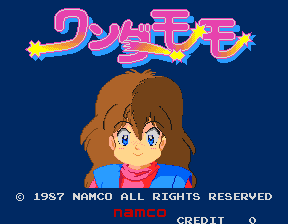
Wonder Momo online spielen. Perform a superhero stage show with kicks, a returning Wonder Hoop and audience photographers who can cause a stun.
Browser-Spiel
Arcade — EmulatorJS-Steuerung
Standard-Tastaturbelegung für Spieler 1. Tasten unter Controller-Einstellungen ändern.
| Konsolentaste | Tastatur |
|---|---|
| ↑ / ↓ / ← / → | ↑ / ↓ / ← / → |
| RetroPad A / B / X / Y | Z / X / A / S |
| L / R | Q / E |
| Münze einwerfen | V |
| START | Enter |
Unter Controller-Einstellungen können Tastatur und Gamepad konfiguriert werden. Auf Mobilgeräten gibt es Touch-Steuerung.
Spielanleitung für Wonder Momo
Schnellstart
- Learn Momo’s ordinary kick.
- Take a transformation opportunity.
- Throw the Wonder Hoop at a clear target.
- Wait for its return and watch the audience.
Steuerung
좌우로 이동하고 아래로 앉습니다. A는 킥, B는 점프이며 위+B는 높은 점프입니다. 변신하면 링을 사용하는 공격이 가능해집니다. 원더 게이지가 한 칸 이상 있을 때 정면을 향해 A를 연타하거나 회오리에 들어가 변신할 수 있습니다. 게이지가 줄어드는 동안 링의 귀환과 적의 접근을 함께 확인하세요.
Wonder Momo — Über das Spiel
Wonder Momo takes place as a superhero show on the Namco Theater stage. Momo begins with kicks, then transforms into Wonder Momo and gains a thrown hoop that must return before it can be launched again. Photographers in the audience can interrupt her performance and leave her exposed to the stage enemies. Learn the ordinary kick’s reach before committing to a hoop throw, then watch both the returning weapon and the audience rather than assuming the transformed heroine can attack continuously.
Cheats
Für diese Version gibt es noch keine Cheats.
Player-Prüfung und Quellen
Das Spielen im Browser wurde vor der Veröffentlichung dieser Fassung im Katalog geprüft. Das Datum unten ist das Katalogdatum, nicht das ursprüngliche Erscheinungsdatum des Spiels.
- Browser-Test und Katalogveröffentlichung
- Browser und Geräte
- PC: Chrome, Edge und Firefox. Mobil: Chrome unter Android und Safari auf iPhone und iPad.
- Player-Engine und Core
- EmulatorJS 4.3.0-pre · arcade
- Getestet von
- rwEmulator
Quellen und redaktionelle Grundlage
rwEmulator prüft Fassungsdaten, Veröffentlichungsangaben, Handbücher und eigene Browser-Tests. Verfügbare Handbücher sind unten verlinkt; die Redaktionsrichtlinie erläutert Prüfung und Korrekturen.