More browsing paths
Play Adventures of Pinocchio (Europe edition · English) Online
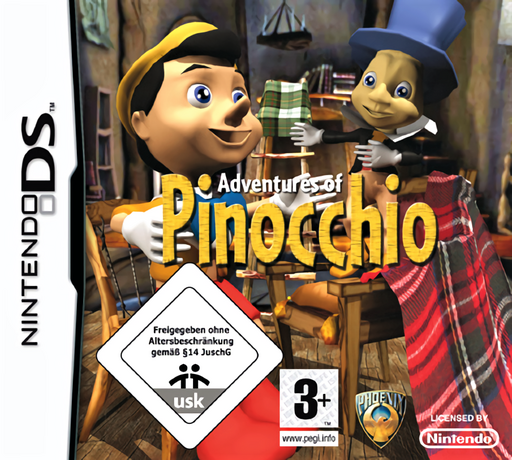
Adventures of Pinocchio
Play Adventures of Pinocchio online. Match pairs, assemble pictures and spot differences in a Pinocchio puzzle-and-colouring collection. Learn how to begin and use the Nintendo DS menus.
Browser play
Nintendo DS (NDS) — EmulatorJS controls
Default Player 1 keyboard mapping. Change keys in Controller Settings.
| Console button | Keyboard |
|---|---|
| ↑ / ↓ / ← / → | ↑ / ↓ / ← / → |
| A / B / X / Y | Z / X / A / S |
| L / R | Q / E |
| START / SELECT | Enter / V |
| Microphone | Not assigned |
Open Controller Settings to configure your keyboard or gamepad. Touch controls are available on mobile.
How to Play Adventures of Pinocchio
Quick start
Open the game menu and choose pairs or a jigsaw. In pairs, reveal two pictures, remember their positions and keep looking for matching images. For a jigsaw, inspect the whole picture and start with recognisable edges or features.
Controls
Use the stylus to choose activities and picture elements. Tap cards in the pairs game, manipulate pieces through the jigsaw controls and tap differing details in the comparison game. Select a colour and touch the picture when colouring.
Adventures of Pinocchio — About this game
Adventures of Pinocchio uses Pinocchio’s animated story as the setting for four small games, including pairs, jigsaws and spot-the-difference. Choose an activity from the collection and focus on the picture in front of you. A matching round asks you to remember where pictures appeared, while a jigsaw shifts attention to edges and the completed image. Picture colouring and a cartoon viewing option offer a quieter change of pace between puzzles. Work through one image carefully before switching modes, using what you recognise from the characters and scenery to distinguish similar pieces or details.
Adventures of Pinocchio Game manuals
Cheats
No cheats have been added for this edition.
Player verification and sources
Browser play was reviewed before this edition was published in the catalogue. The date below is the catalogue publication date, not the game’s original release date.
- Browser test and catalogue publication date
- Browsers and devices
- PC: Chrome, Edge and Firefox. Mobile: Chrome on Android and Safari on iPhone and iPad.
- Player engine and core
- EmulatorJS 4.3.0-pre · nds
- Tested by
- rwEmulator
Sources and editorial basis
rwEmulator reviews edition metadata, release information, game manuals and first-hand browser-play notes. Available manuals are linked below; the editorial policy explains how facts are checked and corrections are handled.