More browsing paths
Play The Adventures of the Smurfs (Europe edition · English / French / German / Spanish / Italian / Dutch) Online
Adventures of the Smurfs, The
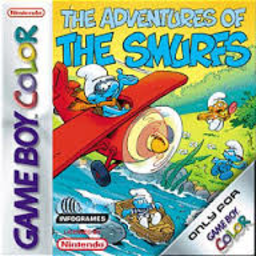
Play The Adventures of the Smurfs online on GBC. The Adventures of the Smurfs sends Handy Smurf after machine components to help Papa Smurf reverse a color-changing mishap.
Browser play
Game Boy Color (GBC) — EmulatorJS controls
Default Player 1 keyboard mapping. Change keys in Controller Settings.
| Console button | Keyboard |
|---|---|
| ↑ / ↓ / ← / → | ↑ / ↓ / ← / → |
| A / B | Z / X |
| START / SELECT | Enter / V |
Open Controller Settings to configure your keyboard or gamepad. Touch controls are available on mobile.
How to Play The Adventures of the Smurfs
Quick start
Read the opening problem, learn what component is wanted and explore the first accessible area. Try the basic action safely, collect the requested object and return when the task directs you.
Controls
D-pad moves the character or selects options. A confirms and performs the current interaction; B cancels or performs the available secondary action. Read each activity’s displayed instructions when movement changes.
The Adventures of the Smurfs — About this game
Read a task before leaving and look at the area for routes rather than following the first open direction indefinitely. Check corners and objects that could connect to the requested component. When an area changes how you move, learn its action safely before pressing forward. Returning with the right part is more useful than simply clearing every visible path.
Cheats
No cheats have been added for this edition.
Player verification and sources
Browser play was reviewed before this edition was published in the catalogue. The date below is the catalogue publication date, not the game’s original release date.
- Browser test and catalogue publication date
- Browsers and devices
- PC: Chrome, Edge and Firefox. Mobile: Chrome on Android and Safari on iPhone and iPad.
- Player engine and core
- EmulatorJS 4.3.0-pre · gb
- Tested by
- rwEmulator
Sources and editorial basis
rwEmulator reviews edition metadata, release information, game manuals and first-hand browser-play notes. Available manuals are linked below; the editorial policy explains how facts are checked and corrections are handled.