More browsing paths
Play Antz (GB Compatible · Europe edition · English / French / German / Spanish / Italian / Dutch) Online
Antz
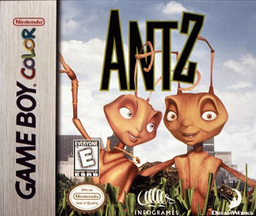
Play Antz online on GBC. Follow Z beyond the routines of the ant colony after meeting Princess Bala. The adventure turns the film’s search for freedom and Insectopia into platform routes, hazards and encounters that demand careful movement.
Browser play
Game Boy Color (GBC) — EmulatorJS controls
Default Player 1 keyboard mapping. Change keys in Controller Settings.
| Console button | Keyboard |
|---|---|
| ↑ / ↓ / ← / → | ↑ / ↓ / ← / → |
| A / B | Z / X |
| START / SELECT | Enter / V |
Open Controller Settings to configure your keyboard or gamepad. Touch controls are available on mobile.
How to Play Antz
Quick start
Start a new game, read the introduction and practise A to jump and B to throw the pickaxe. Check side routes for keys and note the password when you have found all three.
Controls
The D-pad moves and changes menu options. A jumps, B throws a pickaxe. START confirms choices and toggles pause. Collect three keys in a level for its password.
Antz — About this game
Antz for Game Boy Color. Jump over gaps, use the thrown pickaxe when the path is blocked and watch the space where you will land. Finding three keys in a level earns a password at its end, so exploration can protect future progress as well as provide a detour.
Antz Game manuals
Cheats
No cheats have been added for this edition.
Player verification and sources
Browser play was reviewed before this edition was published in the catalogue. The date below is the catalogue publication date, not the game’s original release date.
- Browser test and catalogue publication date
- Browsers and devices
- PC: Chrome, Edge and Firefox. Mobile: Chrome on Android and Safari on iPhone and iPad.
- Player engine and core
- EmulatorJS 4.3.0-pre · gb
- Tested by
- rwEmulator
Sources and editorial basis
rwEmulator reviews edition metadata, release information, game manuals and first-hand browser-play notes. Available manuals are linked below; the editorial policy explains how facts are checked and corrections are handled.