More browsing paths
Play Three Wonders (World 910520) (World edition · Revision 910520 · English) Online
Three Wonders (World 910520)
Play Three Wonders (World 910520) online. Choose a platform adventure, an airborne shooter or a block-pushing puzzle in one arcade collection.
Browser play
Arcade — EmulatorJS controls
Default Player 1 keyboard mapping. Change keys in Controller Settings.
| Console button | Keyboard |
|---|---|
| ↑ / ↓ / ← / → | ↑ / ↓ / ← / → |
| RetroPad A / B / X / Y | Z / X / A / S |
| L / R | Q / E |
| Insert coin | V |
| START | Enter |
Open Controller Settings to configure your keyboard or gamepad. Touch controls are available on mobile.
How to Play Three Wonders (World 910520)
Quick start
- Choose Midnight Wanderers, Chariot or Don’t Pull.
- In Midnight Wanderers, learn the running, climbing and shooting actions.
- In Chariot, concentrate on positioning while firing.
- In Don’t Pull, line a block up with a monster before pushing it.
Controls
Actions depend on the selected game. Midnight Wanderers uses platform movement, climbing and shooting; Chariot uses flying movement and shooting; Don’t Pull moves around an arena and pushes blocks into monsters.
Three Wonders (World 910520) — About this game
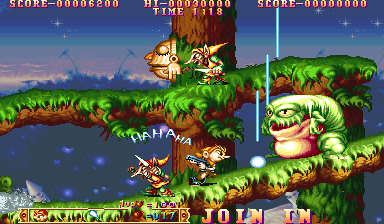
Three Wonders (World 910520) offers three distinct games from the same arcade selection. Midnight Wanderers sends Lou and Siva through a platform adventure with running, climbing and shooting against a force turning people into wooden statues. Chariot takes those characters into an airborne scrolling shooter. Don’t Pull changes both cast and pace, putting a rabbit or squirrel into a puzzle arena where pushed blocks crush monsters. Choosing the game is therefore the first real gameplay decision: the platformer’s movement habits do not replace the shooter’s positioning or the puzzle game’s attention to an available block.
Three Wonders (World 910520) Game manuals
Cheats
Infinite Credits
1 "开启", 0, 0xFF0D59, 0x09Infinite Lives PL1
1 "开启", 0, 0xFF0DE7, 0x03Infinite Lives PL2
1 "开启", 0, 0xFF0DE8, 0x03Infinite Time
1 "开启", 0, 0xFF1011, 0x09Exploiting all Boss's energy
1 "开启", 0, 0xFF101F, 0x00, 0, 0xFF1026, 0x00Infinite Ammo (Super Bomb) PL1
1 "开启", 0, 0xFF0E36, 0xFFSelect Weapon PL1
1 "普通", 0, 0xFF0E14, 0x01
2 "钩镰枪", 0, 0xFF0E14, 0x02
3 "钩尾枪", 0, 0xFF0E14, 0x03
4 "弹跳激光", 0, 0xFF0E14, 0x04
5 "超级炸弹", 0, 0xFF0E14, 0x00
Select the outer-mounted weapon PL1
1 "火焰", 0, 0xFF0DE3, 0x01
2 "圆型环绕", 0, 0xFF0DE3, 0x02
Always a heart = one life PL1
1 "开启", 0, 0xFF0E17, 0x63, 0, 0xFF0E19, 0x64One heart at once = one life PL1
1 "开启", 0, 0xFF0E17, 0x63, 0, 0xFF0E19, 0x64Select the number of forces PL1
1 "普通", 0, 0xFF0DE4, 0x00
2 "双倍", 0, 0xFF0DE4, 0x01
Infinite Ammo (super bomb) PL2
1 "开启", 0, 0xFF0E38, 0xFFSelect Weapon PL2
1 "普通", 0, 0xFF0E15, 0x01
2 "钩镰枪", 0, 0xFF0E15, 0x02
3 "钩尾枪", 0, 0xFF0E15, 0x03
4 "弹跳激光", 0, 0xFF0E15, 0x04
5 "超级炸弹", 0, 0xFF0E15, 0x00
Select the outer-mounted weapon PL2
1 "火焰", 0, 0xFF0DE5, 0x01
2 "圆型环绕", 0, 0xFF0DE5, 0x02
Always a heart = one life PL2
1 "开启", 0, 0xFF0E1B, 0x63, 0, 0xFF0E1D, 0x64One heart at once = one life PL2
1 "开启", 0, 0xFF0E1B, 0x63, 0, 0xFF0E1D, 0x64Select the number of power PL2
1 "普通", 0, 0xFF0DE6, 0x00
2 "双倍", 0, 0xFF0DE6, 0x01
Infinite Boss Time
1 "开启", 0, 0xFF1002, 0x27, 0, 0xFF1003, 0x0FAlways a heart = one life PL1
1 "开启", 0, 0xFF184D, 0x59, 0, 0xFF184C, 0x5AOne heart at once = one life PL1
1 "开启", 0, 0xFF184D, 0x59, 0, 0xFF184C, 0x5APlayer verification and sources
Browser play was reviewed before this edition was published in the catalogue. The date below is the catalogue publication date, not the game’s original release date.
- Browser test and catalogue publication date
- Browsers and devices
- PC: Chrome, Edge and Firefox. Mobile: Chrome on Android and Safari on iPhone and iPad.
- Player engine and core
- EmulatorJS 4.3.0-pre · arcade
- Tested by
- rwEmulator
Sources and editorial basis
rwEmulator reviews edition metadata, release information, game manuals and first-hand browser-play notes. Available manuals are linked below; the editorial policy explains how facts are checked and corrections are handled.