More browsing paths
Play Alien Challenge (China) (China edition · Chinese) Online
Alien Challenge (China)
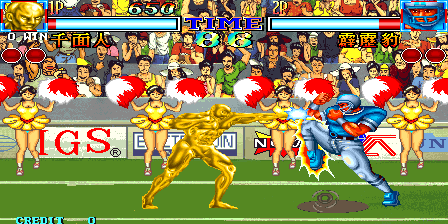
Play Alien Challenge (China) online. Choose a fighter, control distance and learn a special before attempting desperation attacks.
Browser play
Arcade — EmulatorJS controls
Default Player 1 keyboard mapping. Change keys in Controller Settings.
| Console button | Keyboard |
|---|---|
| ↑ / ↓ / ← / → | ↑ / ↓ / ← / → |
| RetroPad A / B / X / Y | Z / X / A / S |
| L / R | Q / E |
| Insert coin | V |
| START | Enter |
Open Controller Settings to configure your keyboard or gamepad. Touch controls are available on mobile.
How to Play Alien Challenge (China)
Quick start
- Select a fighter.
- Use the joystick and the three punch or three kick strengths to attack.
- Double-tap forward to dash or back to retreat.
- As Nic-San, try Down, Down-forward, Forward + Punch for Umbrella Shot.
Controls
Six attack buttons: weak/medium/strong Punch and weak/medium/strong Kick. Forward twice: dash. Back twice: retreat. Nic-San Umbrella Shot: Down, Down-forward, Forward + Punch. Desperation moves require a flashing life bar.
Alien Challenge (China) — About this game
Alien Challenge (China) pits eight unusual fighters against one another in best-of-three bouts before the surviving contender faces Claus. Six attack strengths separate light, medium and heavy punches from the equivalent kicks, giving special-move inputs several possible finishes. Forward and backward double taps provide quick movement, and desperation techniques require a flashing life bar. Each character brings a distinct set of moves, so learning a reliable special and controlling distance are useful first steps toward the final opponent.
Cheats
Infinite Credits
1 "开启", 0, 0x20C7B9, 0x63Infinite Time
1 "开启", 0, 0x200F2F, 0x64Complete Stage
1 "开启", 0, 0x200F2F, 0x00Infinite Energy PL1
1 "开启", 0, 0x200FC3, 0x80, 0, 0x20858E, 0x00, 0, 0x20858F, 0x31, 0, 0x208590, 0x82, 0, 0x208591, 0x18Drain All Energy PL1
1 "开启", 0, 0x200FC3, 0x00Select Character PL1
1 "黄飞鸿", 0, 0x200F5E, 0x00
2 "神龙(忍者)", 0, 0x200F5E, 0x01
3 "千面人(黄金人)", 0, 0x200F5E, 0x02
4 "黑杰克(小丑)", 0, 0x200F5E, 0x03
5 "霹雳豹(美国四分卫)", 0, 0x200F5E, 0x04
6 "灰狼(英国狼人)", 0, 0x200F5E, 0x05
7 "火狐狸(火焰)", 0, 0x200F5E, 0x06
8 "花木兰", 0, 0x200F5E, 0x07
9 "#仙翁", 0, 0x200F5E, 0x08
Infinite Energy PL2
1 "开启", 0, 0x2010A5, 0x80, 0, 0x2085C0, 0x00, 0, 0x2085C1, 0x31, 0, 0x2085C2, 0x82, 0, 0x2085C3, 0xC4Drain All Energy PL2
1 "开启", 0, 0x2010A5, 0x00Select Character PL2
1 "黄飞鸿", 0, 0x201040, 0x00
2 "神龙(忍者)", 0, 0x201040, 0x01
3 "千面人(黄金人)", 0, 0x201040, 0x02
4 "黑杰克(小丑)", 0, 0x201040, 0x03
5 "霹雳豹(美国四分卫)", 0, 0x201040, 0x04
6 "灰狼(英国狼人)", 0, 0x201040, 0x05
7 "火狐狸(火焰)", 0, 0x201040, 0x06
8 "花木兰", 0, 0x201040, 0x07
9 "#仙翁", 0, 0x201040, 0x08Player verification and sources
Browser play was reviewed before this edition was published in the catalogue. The date below is the catalogue publication date, not the game’s original release date.
- Browser test and catalogue publication date
- Browsers and devices
- PC: Chrome, Edge and Firefox. Mobile: Chrome on Android and Safari on iPhone and iPad.
- Player engine and core
- EmulatorJS 4.3.0-pre · arcade
- Tested by
- rwEmulator
Sources and editorial basis
rwEmulator reviews edition metadata, release information, game manuals and first-hand browser-play notes. Available manuals are linked below; the editorial policy explains how facts are checked and corrections are handled.