More browsing paths
Play Aliens (World set 4) (World edition · English) Online
Aliens (World set 4)
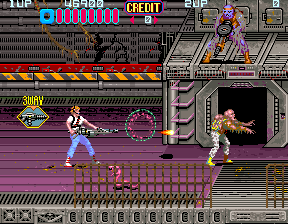
Swap the smart gun for a flamethrower or rockets as side-scrolling action alternates with other viewpoints.
Browser play
Arcade — EmulatorJS controls
Default Player 1 keyboard mapping. Change keys in Controller Settings.
| Console button | Keyboard |
|---|---|
| ↑ / ↓ / ← / → | ↑ / ↓ / ← / → |
| RetroPad A / B / X / Y | Z / X / A / S |
| L / R | Q / E |
| Insert coin | V |
| START | Enter |
Open Controller Settings to configure your keyboard or gamepad. Touch controls are available on mobile.
How to Play Aliens (World set 4)
Quick start
Try low shots against small enemies and check which weapon you picked up. On the APC, remember that the second button fires rockets from a limited stock.
Controls
Move with the joystick. A fires while standing and B fires while crouching. On the APC, A uses the basic weapon and B fires an available rocket.
Aliens (World set 4) — About this game
Your smart gun can give way to a flamethrower or rockets as the route switches between side-scrolling sections and other viewpoints. Firing height matters against smaller creatures. APC sections also change the second button’s function, so check the situation before attacking.
Aliens (World set 4) Game manuals
Cheats
No cheats have been added for this edition.
Player verification and sources
Browser play was reviewed before this edition was published in the catalogue. The date below is the catalogue publication date, not the game’s original release date.
- Browser test and catalogue publication date
- Browsers and devices
- PC: Chrome, Edge and Firefox. Mobile: Chrome on Android and Safari on iPhone and iPad.
- Player engine and core
- EmulatorJS 4.3.0-pre · arcade
- Tested by
- rwEmulator
Sources and editorial basis
rwEmulator reviews edition metadata, release information, game manuals and first-hand browser-play notes. Available manuals are linked below; the editorial policy explains how facts are checked and corrections are handled.