More browsing paths
Play The Battle-Road (English) Online
The Battle-Road
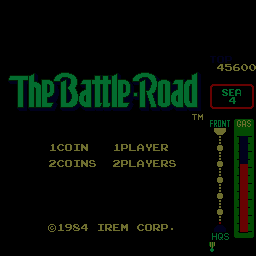
Play The Battle-Road online. Choose a branch and use the front or side guns against the next hostile vehicle.
Browser play
Arcade — EmulatorJS controls
Default Player 1 keyboard mapping. Change keys in Controller Settings.
| Console button | Keyboard |
|---|---|
| ↑ / ↓ / ← / → | ↑ / ↓ / ← / → |
| RetroPad A / B / X / Y | Z / X / A / S |
| L / R | Q / E |
| Insert coin | V |
| START | Enter |
Open Controller Settings to configure your keyboard or gamepad. Touch controls are available on mobile.
How to Play The Battle-Road
Quick start
- Steer into a clear road position.
- Fire the front gun at a vehicle ahead.
- Use the side guns against a flanking threat.
- Choose a branch while avoiding the next obstacle.
Controls
Steer with the joystick. Front Gun attacks ahead and Side Guns cover the sides. Keep clear of other vehicles and roadside obstacles while choosing the next branch.
The Battle-Road — About this game
The Battle-Road sends an armed car through branching roads full of hostile vehicles. Front and side guns cover different approaches, with motorcycles, cars, trucks and helicopters joining the opposition. Choosing a branch changes the route through the road network. Keeping a clear path between the traffic and roadside obstacles matters as much as destroying a vehicle that has moved into firing position.
Cheats
Character Invincibility
1 "开启", 0, 0xED11, 0x40Player verification and sources
Browser play was reviewed before this edition was published in the catalogue. The date below is the catalogue publication date, not the game’s original release date.
- Browser test and catalogue publication date
- Browsers and devices
- PC: Chrome, Edge and Firefox. Mobile: Chrome on Android and Safari on iPhone and iPad.
- Player engine and core
- EmulatorJS 4.3.0-pre · arcade
- Tested by
- rwEmulator
Sources and editorial basis
rwEmulator reviews edition metadata, release information, game manuals and first-hand browser-play notes. Available manuals are linked below; the editorial policy explains how facts are checked and corrections are handled.