More browsing paths
Play Candy Candy (English) Online
Candy Candy
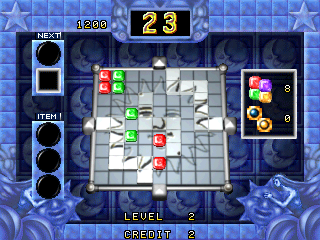
Play Candy Candy online. Move the panel and assemble four matching blocks to clear groups from the puzzle field.
Browser play
Arcade — EmulatorJS controls
Default Player 1 keyboard mapping. Change keys in Controller Settings.
| Console button | Keyboard |
|---|---|
| ↑ / ↓ / ← / → | ↑ / ↓ / ← / → |
| RetroPad A / B / X / Y | Z / X / A / S |
| L / R | Q / E |
| Insert coin | V |
| START | Enter |
Open Controller Settings to configure your keyboard or gamepad. Touch controls are available on mobile.
How to Play Candy Candy
Quick start
- Inspect the nearby block colours.
- Move the panel with the joystick.
- Assemble four matching blocks to clear them.
- Plan the next group from the resulting space.
Controls
The joystick moves the panel. Assemble four matching blocks to clear them.
Candy Candy — About this game
Candy Candy uses a movable panel to organise coloured blocks. Bringing four matching blocks together clears them, so the next movement needs a useful group rather than simply another place to put a piece. Watch how one panel movement changes the nearby colours, then build the next four-block match from the opening left by the previous clear.
Cheats
No cheats have been added for this edition.
Player verification and sources
Browser play was reviewed before this edition was published in the catalogue. The date below is the catalogue publication date, not the game’s original release date.
- Browser test and catalogue publication date
- Browsers and devices
- PC: Chrome, Edge and Firefox. Mobile: Chrome on Android and Safari on iPhone and iPad.
- Player engine and core
- EmulatorJS 4.3.0-pre · arcade
- Tested by
- rwEmulator
Sources and editorial basis
rwEmulator reviews edition metadata, release information, game manuals and first-hand browser-play notes. Available manuals are linked below; the editorial policy explains how facts are checked and corrections are handled.