More browsing paths
Play China Town (Japan) (Japan edition · Japanese) Online
China Town (Japan)
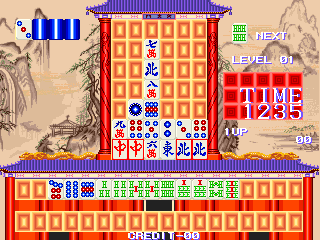
Play China Town (Japan) online. Arrange three identical or sequential tiles in a row, column or L before time expires.
Browser play
Arcade — EmulatorJS controls
Default Player 1 keyboard mapping. Change keys in Controller Settings.
| Console button | Keyboard |
|---|---|
| ↑ / ↓ / ← / → | ↑ / ↓ / ← / → |
| RetroPad A / B / X / Y | Z / X / A / S |
| L / R | Q / E |
| Insert coin | V |
| START | Enter |
Open Controller Settings to configure your keyboard or gamepad. Touch controls are available on mobile.
How to Play China Town (Japan)
Quick start
- Compare the values of the available tiles.
- Find three identical tiles or a sequence.
- Arrange them horizontally, vertically or in an L.
- Continue building the required mahjong set within the time limit.
Controls
Use the directional controls to move the tile selection. Use the action inputs to pick, place or confirm a tile while forming identical or sequential groups of three; their physical assignment is not inferred from generic labels.
China Town (Japan) — About this game
China Town (Japan) uses mahjong relationships inside a timed tile-arranging puzzle. Three tiles can clear when placed horizontally, vertically or in an L, but their values must form an identical group or a valid sequence. Matching the relationship as well as the shape distinguishes it from a simple colour puzzle. Completing those arrangements builds the requested mahjong set before the available time expires.
Cheats
Infinite Credits
1 "开启", 0, 0x1A000B, 0x99Infinite Time
1 "开启", 0, 0x1A0031, 0x99Player verification and sources
Browser play was reviewed before this edition was published in the catalogue. The date below is the catalogue publication date, not the game’s original release date.
- Browser test and catalogue publication date
- Browsers and devices
- PC: Chrome, Edge and Firefox. Mobile: Chrome on Android and Safari on iPhone and iPad.
- Player engine and core
- EmulatorJS 4.3.0-pre · arcade
- Tested by
- rwEmulator
Sources and editorial basis
rwEmulator reviews edition metadata, release information, game manuals and first-hand browser-play notes. Available manuals are linked below; the editorial policy explains how facts are checked and corrections are handled.