More browsing paths
Play Chopper I (US) (US edition · English) Online
Chopper I (US)
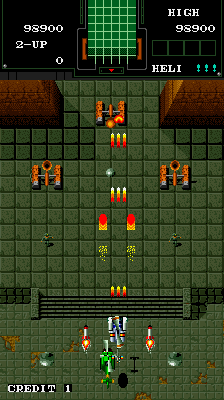
Play Chopper I (US) online. Upgrade the helicopter’s firepower and avoid the boss nets that temporarily prevent movement and shooting.
Browser play
Arcade — EmulatorJS controls
Default Player 1 keyboard mapping. Change keys in Controller Settings.
| Console button | Keyboard |
|---|---|
| ↑ / ↓ / ← / → | ↑ / ↓ / ← / → |
| RetroPad A / B / X / Y | Z / X / A / S |
| L / R | Q / E |
| Insert coin | V |
| START | Enter |
Open Controller Settings to configure your keyboard or gamepad. Touch controls are available on mobile.
How to Play Chopper I (US)
Quick start
- Shoot an approaching aircraft.
- Attack the troops or defences on the ground.
- Collect a firepower pickup.
- Keep clear of a boss’s spreading net.
Controls
Pilota l’elicottero, usa il cannone frontale e raccogli i potenziamenti. Le bombe danneggiano i nemici e rimuovono i proiettili sullo schermo.
Chopper I (US) — About this game
Chopper I (US) sends one or two helicopters through a vertical assault against both ground troops and enemy aircraft. Firepower upgrades improve the ammunition available for those mixed targets. Some bosses deploy nets that temporarily trap the helicopter and prevent it from shooting, adding an immobilising threat to the usual incoming fire. Avoiding that capture preserves the ability to attack the next approach.
Chopper I (US) Game manuals
Cheats
No cheats have been added for this edition.
Player verification and sources
Browser play was reviewed before this edition was published in the catalogue. The date below is the catalogue publication date, not the game’s original release date.
- Browser test and catalogue publication date
- Browsers and devices
- PC: Chrome, Edge and Firefox. Mobile: Chrome on Android and Safari on iPhone and iPad.
- Player engine and core
- EmulatorJS 4.3.0-pre · arcade
- Tested by
- rwEmulator
Sources and editorial basis
rwEmulator reviews edition metadata, release information, game manuals and first-hand browser-play notes. Available manuals are linked below; the editorial policy explains how facts are checked and corrections are handled.