More browsing paths
Play Frog Feast (CPS-1) Online
Frog Feast (CPS-1)
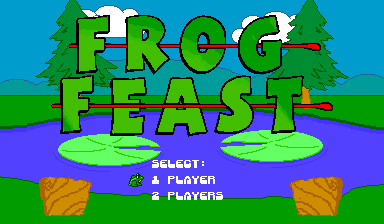
Play Frog Feast (CPS-1) online. Catch more flies than the opposing frog before the timer runs out.
Browser play
Arcade — EmulatorJS controls
Default Player 1 keyboard mapping. Change keys in Controller Settings.
| Console button | Keyboard |
|---|---|
| ↑ / ↓ / ← / → | ↑ / ↓ / ← / → |
| RetroPad A / B / X / Y | Z / X / A / S |
| L / R | Q / E |
| Insert coin | V |
| START | Enter |
Open Controller Settings to configure your keyboard or gamepad. Touch controls are available on mobile.
How to Play Frog Feast (CPS-1)
Quick start
- Move the frog beneath a reachable fly.
- Catch it before the opponent does.
- Reposition for the next fly rather than waiting in a poor lane.
- Finish with more catches before time expires.
Controls
Use the four-way joystick to move. The exact CPS-1 registration exposes Attack, Jump and Special inputs for each player; use the displayed mapping for the frog's actions.
Frog Feast (CPS-1) — About this game
Watch insects moving across the top of the playfield and time each catch. Competition for the same flies makes late interception valuable. The immediate objective is to read the stage, use the confirmed movement and action interface deliberately, and preserve the available time, room or lives until the next goal is reached.
Cheats
No cheats have been added for this edition.
Player verification and sources
Browser play was reviewed before this edition was published in the catalogue. The date below is the catalogue publication date, not the game’s original release date.
- Browser test and catalogue publication date
- Browsers and devices
- PC: Chrome, Edge and Firefox. Mobile: Chrome on Android and Safari on iPhone and iPad.
- Player engine and core
- EmulatorJS 4.3.0-pre · arcade
- Tested by
- rwEmulator
Sources and editorial basis
rwEmulator reviews edition metadata, release information, game manuals and first-hand browser-play notes. Available manuals are linked below; the editorial policy explains how facts are checked and corrections are handled.