More browsing paths
Play Double Dragon (World set 1) (World edition · English) Online
Double Dragon (World set 1)
Fight through hostile city districts with the Lee brothers’ strikes, throws and captured weapons.
Browser play
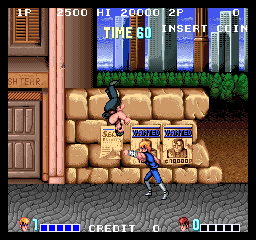
Arcade — EmulatorJS controls
Default Player 1 keyboard mapping. Change keys in Controller Settings.
| Console button | Keyboard |
|---|---|
| ↑ / ↓ / ← / → | ↑ / ↓ / ← / → |
| RetroPad A / B / X / Y | Z / X / A / S |
| L / R | Q / E |
| Insert coin | V |
| START | Enter |
Open Controller Settings to configure your keyboard or gamepad. Touch controls are available on mobile.
How to Play Double Dragon (World set 1)
Quick start
Compare strikes and throws against a nearby enemy. Then try a captured weapon with enough room to use its reach.
Controls
Move your fighter, strike, throw and use weapons taken from enemies.
Double Dragon (World set 1) — About this game
The Lee brothers use strikes, throws and captured weapons to cross hostile city districts. Taking an enemy’s weapon can change the next encounter. Setting up a throw or using a picked-up weapon’s reach calls for different preparation from a simple punch.
Cheats
Infinite Time
1 "开启", 0, 0xE5E, 0x99Infinite Lives PL1
1 "开启", 0, 0x3EA, 0x09Infinite Energy PL1
1 "开启", 0, 0x3C1, 0x35Infinite Lives PL2
1 "开启", 0, 0x448, 0x09Infinite Energy PL2
1 "开启", 0, 0x41F, 0x35Player verification and sources
Browser play was reviewed before this edition was published in the catalogue. The date below is the catalogue publication date, not the game’s original release date.
- Browser test and catalogue publication date
- Browsers and devices
- PC: Chrome, Edge and Firefox. Mobile: Chrome on Android and Safari on iPhone and iPad.
- Player engine and core
- EmulatorJS 4.3.0-pre · arcade
- Tested by
- rwEmulator
Sources and editorial basis
rwEmulator reviews edition metadata, release information, game manuals and first-hand browser-play notes. Available manuals are linked below; the editorial policy explains how facts are checked and corrections are handled.