More browsing paths
Play ドンキーコングJr. (Hack) Online
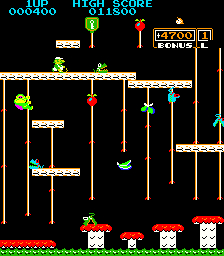
Donkey Kong Jr. (bootleg on Moon Cresta hardware, set 1)
Switch between one and two vines to reach and open your father’s cage.
Browser play
Arcade — EmulatorJS controls
Default Player 1 keyboard mapping. Change keys in Controller Settings.
| Console button | Keyboard |
|---|---|
| ↑ / ↓ / ← / → | ↑ / ↓ / ← / → |
| RetroPad A / B / X / Y | Z / X / A / S |
| L / R | Q / E |
| Insert coin | V |
| START | Enter |
Open Controller Settings to configure your keyboard or gamepad. Touch controls are available on mobile.
How to Play ドンキーコングJr.
Quick start
- Move and jump toward the first vine.
- Practise climbing quickly on two vines and descending quickly on one.
- Drop fruit to clear enemies from the route.
- In the key stage, push the keys upward to open the cage.
Controls
Use the joystick to move and climb or descend vines, and the Jump button to leap. Two vines speed up climbing; one speeds up descending. Check the next vine and platform before you jump.
ドンキーコングJr. — About this game
Junior must rescue his father Donkey Kong from Mario. Alongside platform jumps, climbing and descending vines help avoid enemies. Holding two vines with both hands makes climbing faster; holding one allows a faster descent. Rather than always fleeing upward, change your grip and speed to open a route. Drop fruit to defeat enemies, then push the keys upward in the final challenge to open the cage. Check the landing platform and next vine before jumping, and watch the distance to your pursuers.
Cheats
Infinite Credits
1 "开启", 0, 0x6001, 0x90Infinite Lives
1 "开启", 0, 0x6228, 0x06Player verification and sources
Browser play was reviewed before this edition was published in the catalogue. The date below is the catalogue publication date, not the game’s original release date.
- Browser test and catalogue publication date
- Browsers and devices
- PC: Chrome, Edge and Firefox. Mobile: Chrome on Android and Safari on iPhone and iPad.
- Player engine and core
- EmulatorJS 4.3.0-pre · arcade
- Tested by
- rwEmulator
Sources and editorial basis
rwEmulator reviews edition metadata, release information, game manuals and first-hand browser-play notes. Available manuals are linked below; the editorial policy explains how facts are checked and corrections are handled.