More browsing paths
Play Eggor (English) Online
Eggor
Play Eggor online. Shoot the eggs and clear pursuing vultures while avoiding their return fire.
Browser play
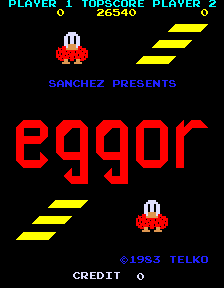
Arcade — EmulatorJS controls
Default Player 1 keyboard mapping. Change keys in Controller Settings.
| Console button | Keyboard |
|---|---|
| ↑ / ↓ / ← / → | ↑ / ↓ / ← / → |
| RetroPad A / B / X / Y | Z / X / A / S |
| L / R | Q / E |
| Insert coin | V |
| START | Enter |
Open Controller Settings to configure your keyboard or gamepad. Touch controls are available on mobile.
How to Play Eggor
Quick start
- Move into a corridor with an egg to destroy.
- Fire at the egg or a pursuing adult vulture.
- Move away from the adults’ shots.
- Continue clearing the remaining eggs.
Controls
Four-way joystick: move through the maze. Fire button: shoot eggs and the adult vultures.
Eggor — About this game
Eggor puts its baby vulture in a maze of eggs guarded by adult vultures. Shooting the eggs provides the main clearing task, while the pursuing birds can also be removed by shooting them. Their return fire makes an exposed corridor dangerous even when it offers another egg to destroy. The different maze layouts change the next safe firing lane, so moving away from an approaching adult can be more useful than continuing to shoot at an egg from the same position.
Cheats
Infinite Lives PL1
1 "开启", 0, 0x4CEC, 0x03Infinite Lives PL2
1 "开启", 0, 0x4CED, 0x03Player verification and sources
Browser play was reviewed before this edition was published in the catalogue. The date below is the catalogue publication date, not the game’s original release date.
- Browser test and catalogue publication date
- Browsers and devices
- PC: Chrome, Edge and Firefox. Mobile: Chrome on Android and Safari on iPhone and iPad.
- Player engine and core
- EmulatorJS 4.3.0-pre · arcade
- Tested by
- rwEmulator
Sources and editorial basis
rwEmulator reviews edition metadata, release information, game manuals and first-hand browser-play notes. Available manuals are linked below; the editorial policy explains how facts are checked and corrections are handled.