More browsing paths
Play Fighter's History (World ver 43-09, DE-0395-1 PCB) (World edition · Revision 43-09 · English) Online
Fighter's History (World ver 43-09, DE-0395-1 PCB)
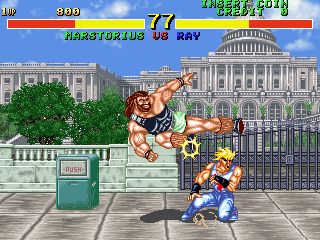
Play Fighter's History (World ver 43-09, DE-0395-1 PCB) online. Choose a martial artist and combine six-button attacks with character-specific special moves and throws.
Browser play
Arcade — EmulatorJS controls
Default Player 1 keyboard mapping. Change keys in Controller Settings.
| Console button | Keyboard |
|---|---|
| ↑ / ↓ / ← / → | ↑ / ↓ / ← / → |
| RetroPad A / B / X / Y | Z / X / A / S |
| L / R | Q / E |
| Insert coin | V |
| START | Enter |
Open Controller Settings to configure your keyboard or gamepad. Touch controls are available on mobile.
How to Play Fighter's History (World ver 43-09, DE-0395-1 PCB)
Quick start
- Choose a fighter whose command list you want to learn.
- Compare light, medium and strong attacks at a safe distance.
- Practise one special-move motion before adding further attacks.
- Approach carefully to use a throw when an opponent is within reach.
Controls
The arcade layout provides weak, medium and strong punch, plus weak, medium and strong kick. Directional motions combine with those buttons for character-specific specials. Throws have their own proximity and directional requirements; consult the selected fighter's command list.
Fighter's History (World ver 43-09, DE-0395-1 PCB) — About this game
Fighter's History (World ver 43-09, DE-0395-1 PCB) brings together martial artists whose command lists give each matchup a different rhythm. Ray uses attacks such as Big Tornado and Dynamite Tackle, while other fighters rely on charge moves, grapples or distinctive follow-ups. Normal attacks are divided into three punch strengths and three kick strengths, so choosing range and commitment matters before attempting a special move. Learn a small set of reliable attacks first, then practise the chosen fighter's motions and close-range throws rather than assuming that every character shares the same commands.
Cheats
Full-screen Attack
1 "开启", 0, 0x10C00, 0xEA,, 0, 0x10C01, 0x00, 0, 0x10C02, 0x00, 0, 0x10C03, 0x0D, 0, 0x10C60, 0xE1, 0, 0x10C61, 0xA0, 0, 0x10C62, 0xEA, 0, 0x10C63, 0x00Infinite Credits
1 "开启", 0, 0x100184, 0x63Infinite Time
1 "开启", 0, 0x1009E5, 0x63Finish Level
1 "开启", 0, 0x1009E5, 0x00P1Infinite Energy
1 "开启", 0, 0x1005DC, 0xFF, 0, 0x100A00, 0xFFP1 energy-free
1 "开启", 0, 0x1005DC, 0x00, 0, 0x100A00, 0x00P1 character selection
1 "Ray McDougal", 0, 0x1005E4, 0x01
2 "Liu Feilin", 0, 0x1005E4, 0x02
3 "Kano Ryoko", 0, 0x1005E4, 0x03
4 "Matlock Jade", 0, 0x1005E4, 0x04
5 "Samchay Diendo", 0, 0x1005E4, 0x05
6 "Lee Diendo", 0, 0x1005E4, 0x06
7 "Mizoguchi Makoto", 0, 0x1005E4, 0x07
8 "Jean Pierre", 0, 0x1005E4, 0x08
9 "Mastorius", 0, 0x1005E4, 0x09
10 "Clown", 0, 0x1005E4, 0x0A
11 "Karnov", 0, 0x1005E4, 0x0B
P2Infinite Energy
1 "开启", 0, 0x1005DD, 0xFF, 0, 0x100B00, 0xFFP1 energy-free
1 "开启", 0, 0x1005DD, 0x00, 0, 0x100B00, 0x00P2 character selection
1 "Ray McDougal", 0, 0x1006E4, 0x01
2 "Liu Feilin", 0, 0x1006E4, 0x02
3 "Kano Ryoko", 0, 0x1006E4, 0x03
4 "Matlock Jade", 0, 0x1006E4, 0x04
5 "Samchay Diendo", 0, 0x1006E4, 0x05
6 "Lee Diendo", 0, 0x1006E4, 0x06
7 "Mizoguchi Makoto", 0, 0x1006E4, 0x07
8 "Jean Pierre", 0, 0x1006E4, 0x08
9 "Mastorius", 0, 0x1006E4, 0x09
10 "Clown", 0, 0x1006E4, 0x0A
11 "Karnov", 0, 0x1006E4, 0x0BPlayer verification and sources
Browser play was reviewed before this edition was published in the catalogue. The date below is the catalogue publication date, not the game’s original release date.
- Browser test and catalogue publication date
- Browsers and devices
- PC: Chrome, Edge and Firefox. Mobile: Chrome on Android and Safari on iPhone and iPad.
- Player engine and core
- EmulatorJS 4.3.0-pre · arcade
- Tested by
- rwEmulator
Sources and editorial basis
rwEmulator reviews edition metadata, release information, game manuals and first-hand browser-play notes. Available manuals are linked below; the editorial policy explains how facts are checked and corrections are handled.