More browsing paths
Play Gee Bee (US) (US edition · English) Online
Gee Bee (US)
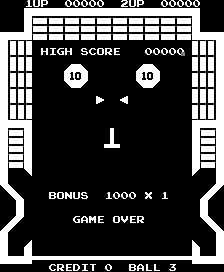
Play Gee Bee (US) online. Move two aligned paddles together and light the rollover symbols to increase the score multiplier.
Browser play
Arcade — EmulatorJS controls
Default Player 1 keyboard mapping. Change keys in Controller Settings.
| Console button | Keyboard |
|---|---|
| ↑ / ↓ / ← / → | ↑ / ↓ / ← / → |
| RetroPad A / B / X / Y | Z / X / A / S |
| L / R | Q / E |
| Insert coin | V |
| START | Enter |
Open Controller Settings to configure your keyboard or gamepad. Touch controls are available on mobile.
How to Play Gee Bee (US)
Quick start
- Turn the dial and watch both moving paddles.
- Return the ball toward the bricks.
- Aim for an unlit rollover symbol.
- Keep the upper paddle aligned for the next rebound.
Controls
Turn the rotary dial to move both horizontal paddles together. Deflect the ball into bricks, bumpers and rollover symbols. Complete the set of lit symbols to raise the multiplier.
Gee Bee (US) — About this game
Gee Bee (US) links two horizontal paddles so the same dial movement changes the return position at both heights. The ball can strike bricks, pop bumpers, spinners and a fixed central surface, combining block clearing with pinball scoring. Lighting every rollover symbol increases the score multiplier. Watching only the bottom paddle misses the second chance to redirect the ball before it reaches the lower part of the field.
Cheats
No cheats have been added for this edition.
Player verification and sources
Browser play was reviewed before this edition was published in the catalogue. The date below is the catalogue publication date, not the game’s original release date.
- Browser test and catalogue publication date
- Browsers and devices
- PC: Chrome, Edge and Firefox. Mobile: Chrome on Android and Safari on iPhone and iPad.
- Player engine and core
- EmulatorJS 4.3.0-pre · arcade
- Tested by
- rwEmulator
Sources and editorial basis
rwEmulator reviews edition metadata, release information, game manuals and first-hand browser-play notes. Available manuals are linked below; the editorial policy explains how facts are checked and corrections are handled.