More browsing paths
Play Grasspin (English) Online
Grasspin
Play Grasspin online. Collect lettered flags, turn maze walls and use life preservers for a river escape.
Browser play
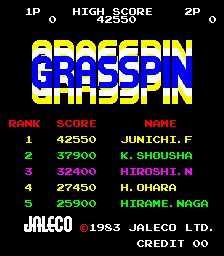
Arcade — EmulatorJS controls
Default Player 1 keyboard mapping. Change keys in Controller Settings.
| Console button | Keyboard |
|---|---|
| ↑ / ↓ / ← / → | ↑ / ↓ / ← / → |
| RetroPad A / B / X / Y | Z / X / A / S |
| L / R | Q / E |
| Insert coin | V |
| START | Enter |
Open Controller Settings to configure your keyboard or gamepad. Touch controls are available on mobile.
How to Play Grasspin
Quick start
- Approach a flag with an escape route open.
- Turn ordinary walls to change the maze.
- Collect a life preserver for river escapes.
- Avoid red walls.
Controls
Move through the maze and push ordinary walls to rotate the route. A life preserver permits a river escape; red walls must not be pushed.
Grasspin — About this game
Grasspin makes its maze movable: pushing a wall changes a corridor between horizontal and vertical arrangements. The aim is to collect the lettered flags while escaping pursuers, but moving a wall carelessly can close the player’s own escape route. Life preservers offer another option at the rivers along the sides of the scrolling maze, letting the character float away from a chase. Check the downstream exit before relying on that escape. Later mazes introduce red walls that cost a life if pushed, so a route that worked safely earlier may become dangerous.
Cheats
No cheats have been added for this edition.
Player verification and sources
Browser play was reviewed before this edition was published in the catalogue. The date below is the catalogue publication date, not the game’s original release date.
- Browser test and catalogue publication date
- Browsers and devices
- PC: Chrome, Edge and Firefox. Mobile: Chrome on Android and Safari on iPhone and iPad.
- Player engine and core
- EmulatorJS 4.3.0-pre · arcade
- Tested by
- rwEmulator
Sources and editorial basis
rwEmulator reviews edition metadata, release information, game manuals and first-hand browser-play notes. Available manuals are linked below; the editorial policy explains how facts are checked and corrections are handled.