More browsing paths
Play Hachoo! (World, set 1) (World edition · English) Online
Hachoo! (World, set 1)
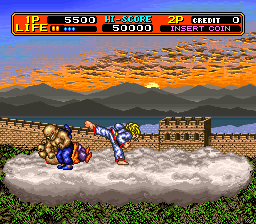
Play Hachoo! (World, set 1) online. Vary moving and stationary attacks, evade with jumps and avoid being thrown into a chasm.
Browser play
Arcade — EmulatorJS controls
Default Player 1 keyboard mapping. Change keys in Controller Settings.
| Console button | Keyboard |
|---|---|
| ↑ / ↓ / ← / → | ↑ / ↓ / ← / → |
| RetroPad A / B / X / Y | Z / X / A / S |
| L / R | Q / E |
| Insert coin | V |
| START | Enter |
Open Controller Settings to configure your keyboard or gamepad. Touch controls are available on mobile.
How to Play Hachoo! (World, set 1)
Quick start
- Attack while standing still.
- Compare the attack while moving.
- Jump a pit without expecting an aerial kick.
- Collect a floating health orb.
Controls
Use Attack and Jump. Joystick movement changes the normal attack between punches and kicks. Jump is for evasion and crossing pits; it does not add an aerial attack.
Hachoo! (World, set 1) — About this game
Hachoo! (World, set 1) sends its martial artist through China to stop a demon escaping its stone prison. The attack changes between punches and kicks according to joystick movement, while jumping avoids danger and crosses pits. Grapples can throw enemies toward the screen or into a chasm, but nearby opponents can reverse the encounter. Floating orbs restore health during the advance.
Cheats
No cheats have been added for this edition.
Player verification and sources
Browser play was reviewed before this edition was published in the catalogue. The date below is the catalogue publication date, not the game’s original release date.
- Browser test and catalogue publication date
- Browsers and devices
- PC: Chrome, Edge and Firefox. Mobile: Chrome on Android and Safari on iPhone and iPad.
- Player engine and core
- EmulatorJS 4.3.0-pre · arcade
- Tested by
- rwEmulator
Sources and editorial basis
rwEmulator reviews edition metadata, release information, game manuals and first-hand browser-play notes. Available manuals are linked below; the editorial policy explains how facts are checked and corrections are handled.