More browsing paths
Play Pirate Ship Higemaru (English) Online
Pirate Ship Higemaru
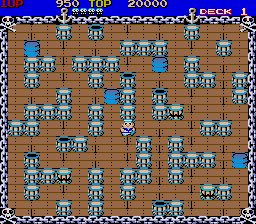
Play Pirate Ship Higemaru online. Defeat pirates by throwing the ship's cargo.
Browser play
Arcade — EmulatorJS controls
Default Player 1 keyboard mapping. Change keys in Controller Settings.
| Console button | Keyboard |
|---|---|
| ↑ / ↓ / ← / → | ↑ / ↓ / ← / → |
| RetroPad A / B / X / Y | Z / X / A / S |
| L / R | Q / E |
| Insert coin | V |
| START | Enter |
Open Controller Settings to configure your keyboard or gamepad. Touch controls are available on mobile.
How to Play Pirate Ship Higemaru
Quick start
- 目の前の樽を持ち上げ、もう一度ボタンを押して転がします。
- 持ったまま移動し、敵が並ぶ方向へ向きを合わせます。
- 樽を除いた後に開く通路を見て、囲まれない場所へ動きます。
- 残った物を使い、必要な数の敵を倒します。
Controls
レバーで移動し、一つのボタンで目の前の樽などを持ち上げます。持った状態でも移動でき、もう一度同じボタンを押すと向いている方向へ転がします。投げる前に敵との位置を合わせ、物が障害物に当たるまでの進路を確認しましょう。
Pirate Ship Higemaru — About this game
Defeat pirates by throwing the ship's cargo. Pick up barrels and other objects to strike enemies across fixed-screen decks.
Cheats
Character Invincibility
1 "开启", 0, 0xE100, 0xFFInfinite Lives PL1
1 "开启", 0, 0xE630, 0x06Infinite Lives PL2
1 "开启", 0, 0xE660, 0x06Player verification and sources
Browser play was reviewed before this edition was published in the catalogue. The date below is the catalogue publication date, not the game’s original release date.
- Browser test and catalogue publication date
- Browsers and devices
- PC: Chrome, Edge and Firefox. Mobile: Chrome on Android and Safari on iPhone and iPad.
- Player engine and core
- EmulatorJS 4.3.0-pre · arcade
- Tested by
- rwEmulator
Sources and editorial basis
rwEmulator reviews edition metadata, release information, game manuals and first-hand browser-play notes. Available manuals are linked below; the editorial policy explains how facts are checked and corrections are handled.