More browsing paths
Play In The Hunt (World) (World edition · English) Online
In The Hunt (World)
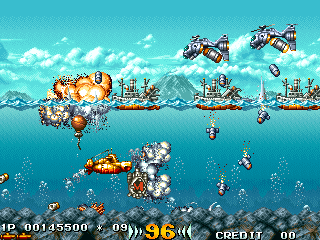
Play In The Hunt (World) online. Advance at your own pace in the Granvia submarine, attacking threats ahead and above the water.
Browser play
Arcade — EmulatorJS controls
Default Player 1 keyboard mapping. Change keys in Controller Settings.
| Console button | Keyboard |
|---|---|
| ↑ / ↓ / ← / → | ↑ / ↓ / ← / → |
| RetroPad A / B / X / Y | Z / X / A / S |
| L / R | Q / E |
| Insert coin | V |
| START | Enter |
Open Controller Settings to configure your keyboard or gamepad. Touch controls are available on mobile.
How to Play In The Hunt (World)
Quick start
- Move forward carefully until the first threats enter view.
- Use the forward weapon against enemies at the submarine’s depth.
- Attack upward when aircraft or surface targets threaten from above.
- Collect a weapon pickup and test its coverage before approaching the next boss.
Controls
Move the submarine with the directional control; the scrolling follows progress rather than forcing constant movement. Use forward fire for submerged enemies and the upward attack for threats above. Weapon pickups change the attack available.
In The Hunt (World) — About this game
In the Hunt gives a submarine control over the pace of its journey: the screen does not force the craft forward automatically. That freedom allows careful approaches to the ships, aircraft and submerged threats ahead, but it does not remove the need to dodge their projectiles. The Granvia’s forward weapons handle enemies at its depth, while upward attacks reach targets above the water. Pickups change the available weapon, including a machine gun, wave cannon and cracker shot. Clear a safe space before advancing, then use the submarine’s different firing directions to meet each threat rather than rushing into the next encounter.
In The Hunt (World) Game manuals
Cheats
Infinite Time
1 "开启", 0, 0xEB8A0, 0x63Select Starting Stage
1 "关卡 1", 0, 0xE0084, 0x00
2 "关卡 2", 0, 0xE0084, 0x01
3 "关卡 3", 0, 0xE0084, 0x02
4 "关卡 4", 0, 0xE0084, 0x03
5 "关卡 5", 0, 0xE0084, 0x04
6 "关卡 6", 0, 0xE0084, 0x05
7 "关卡 7 (最后战斗)", 0, 0xE0084, 0x06
8 "关卡 8 (结束画面)", 0, 0xE0084, 0x07
Infinite Lives PL1
1 "开启", 0, 0xE0118, 0x09Character Invincibility 'Open' PL1
1 "开启", 0, 0xE0A0A, 0x01Character Invincibility 'Close' PL1
1 "开启", 0, 0xE0A0A, 0x00Choose a positive weapon PL1
1 "正常爆破筒", 0, 0xE0110, 0x00, 0, 0xE0112, 0x00
2 "力量爆破筒", 0, 0xE0110, 0x02, 0, 0xE0112, 0x03
3 "波动爆破筒", 0, 0xE0110, 0x04, 0, 0xE0112, 0x03
4 "扩展爆破筒", 0, 0xE0110, 0x06, 0, 0xE0112, 0x03
Select Top Weapon PL1
1 "正常弹药", 0, 0xE0114, 0x00, 0, 0xE0116, 0x00
2 "A炸弹", 0, 0xE0114, 0x02, 0, 0xE0116, 0x05
3 "M炸弹", 0, 0xE0114, 0x04, 0, 0xE0116, 0x05
Infinite Lives PL2
1 "开启", 0, 0xE0158, 0x09Character Invincibility 'Open' PL2
1 "开启", 0, 0xE098A, 0x01Character Invincibility 'Close' PL2
1 "开启", 0, 0xE098A, 0x00Choose a positive weapon PL2
1 "正常爆破筒", 0, 0xE0150, 0x00, 0, 0xE0152, 0x00
2 "力量爆破筒", 0, 0xE0150, 0x02, 0, 0xE0152, 0x03
3 "波动爆破筒", 0, 0xE0150, 0x04, 0, 0xE0152, 0x03
4 "扩展爆破筒", 0, 0xE0150, 0x06, 0, 0xE0152, 0x03
Choose Top Weapon PL2
1 "正常弹药", 0, 0xE0154, 0x00, 0, 0xE0156, 0x00
2 "A炸弹", 0, 0xE0154, 0x02, 0, 0xE0156, 0x05
3 "M炸弹", 0, 0xE0154, 0x04, 0, 0xE0156, 0x05Player verification and sources
Browser play was reviewed before this edition was published in the catalogue. The date below is the catalogue publication date, not the game’s original release date.
- Browser test and catalogue publication date
- Browsers and devices
- PC: Chrome, Edge and Firefox. Mobile: Chrome on Android and Safari on iPhone and iPad.
- Player engine and core
- EmulatorJS 4.3.0-pre · arcade
- Tested by
- rwEmulator
Sources and editorial basis
rwEmulator reviews edition metadata, release information, game manuals and first-hand browser-play notes. Available manuals are linked below; the editorial policy explains how facts are checked and corrections are handled.