More browsing paths
Play Lucky Boom (English) Online
Lucky Boom
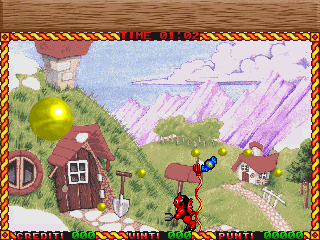
Play Lucky Boom online. Split bouncing red balls with upward shots and their ropes during a timed score attempt.
Browser play
Arcade — EmulatorJS controls
Default Player 1 keyboard mapping. Change keys in Controller Settings.
| Console button | Keyboard |
|---|---|
| ↑ / ↓ / ← / → | ↑ / ↓ / ← / → |
| RetroPad A / B / X / Y | Z / X / A / S |
| L / R | Q / E |
| Insert coin | V |
| START | Enter |
Open Controller Settings to configure your keyboard or gamepad. Touch controls are available on mobile.
How to Play Lucky Boom
Quick start
- Move beneath a safe firing lane.
- Fire upward at a bouncing ball.
- Avoid the smaller balls produced by the split.
- Continue splitting them until they disappear.
Controls
Move Left or Right. Fire sends the projectile straight upward with a rope behind it. Balls split when they touch either the projectile or its rope.
Lucky Boom — About this game
Lucky Boom confines its character to a single screen beneath bouncing red balls. A projectile travels straight upward with a rope behind it, splitting a ball that touches either part into a smaller threat. Repeated splitting eventually makes the smallest balls disappear, but each surviving piece still threatens the character below. The attempt is timed for score, so learn where a bouncing ball will land before firing upward, then leave room to step away from the smaller pieces created by the next successful shot.
Cheats
Invincibility
1 "开启", 0, 0x6162, 0x60Player verification and sources
Browser play was reviewed before this edition was published in the catalogue. The date below is the catalogue publication date, not the game’s original release date.
- Browser test and catalogue publication date
- Browsers and devices
- PC: Chrome, Edge and Firefox. Mobile: Chrome on Android and Safari on iPhone and iPad.
- Player engine and core
- EmulatorJS 4.3.0-pre · arcade
- Tested by
- rwEmulator
Sources and editorial basis
rwEmulator reviews edition metadata, release information, game manuals and first-hand browser-play notes. Available manuals are linked below; the editorial policy explains how facts are checked and corrections are handled.