More browsing paths
Play Mighty Guy (English) Online
Mighty Guy
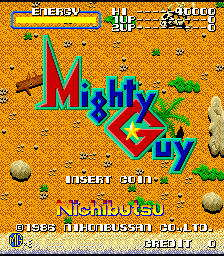
Play Mighty Guy online. Find a safe position before guiding the Psycho Gun through the next enemy group.
Browser play
Arcade — EmulatorJS controls
Default Player 1 keyboard mapping. Change keys in Controller Settings.
| Console button | Keyboard |
|---|---|
| ↑ / ↓ / ← / → | ↑ / ↓ / ← / → |
| RetroPad A / B / X / Y | Z / X / A / S |
| L / R | Q / E |
| Insert coin | V |
| START | Enter |
Open Controller Settings to configure your keyboard or gamepad. Touch controls are available on mobile.
How to Play Mighty Guy
Quick start
- Approach a nearby soldier.
- Use a punch or kick to clear the immediate route.
- Press both attack actions for Psycho Gun.
- Guide its projectile while watching the stationary character.
Controls
Move with the joystick and use the separate punch and kick actions. Press both attack actions together to launch Psycho Gun, then guide its energy projectile while the character remains stationary.
Mighty Guy — About this game
Mighty Guy combines close punches and sliding kicks with a remotely guided Psycho Gun attack. Triggering that energy projectile leaves the character stationary while its path is steered around the screen, trading movement for reach. Weapons picked up along the route add conventional firepower. The advance leads toward the supercomputer ZELDA, with choosing a safe position for the stationary attack an important part of confronting each enemy group.
Cheats
No cheats have been added for this edition.
Player verification and sources
Browser play was reviewed before this edition was published in the catalogue. The date below is the catalogue publication date, not the game’s original release date.
- Browser test and catalogue publication date
- Browsers and devices
- PC: Chrome, Edge and Firefox. Mobile: Chrome on Android and Safari on iPhone and iPad.
- Player engine and core
- EmulatorJS 4.3.0-pre · arcade
- Tested by
- rwEmulator
Sources and editorial basis
rwEmulator reviews edition metadata, release information, game manuals and first-hand browser-play notes. Available manuals are linked below; the editorial policy explains how facts are checked and corrections are handled.