More browsing paths
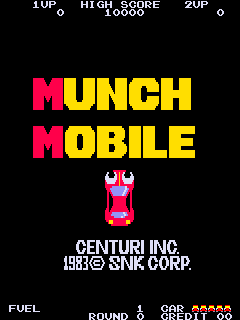
Play Munch Mobile (US) (US edition · English) Online
Munch Mobile (US)
Play Munch Mobile (US) online. Steer clear of traffic while using the extending hands to collect fuel and roadside food.
Browser play
Arcade — EmulatorJS controls
Default Player 1 keyboard mapping. Change keys in Controller Settings.
| Console button | Keyboard |
|---|---|
| ↑ / ↓ / ← / → | ↑ / ↓ / ← / → |
| RetroPad A / B / X / Y | Z / X / A / S |
| L / R | Q / E |
| Insert coin | V |
| START | Enter |
Open Controller Settings to configure your keyboard or gamepad. Touch controls are available on mobile.
How to Play Munch Mobile (US)
Quick start
- Keep the car within the road.
- Extend a hand toward a safe roadside item.
- Collect fuel before the supply runs out.
- Put food remains into a passing rubbish bin.
Controls
Use the car control to steer and the separate hand control to reach toward roadside objects. Avoid trees and obstacles with the hand, as an injury temporarily prevents collection.
Munch Mobile (US) — About this game
Munch Mobile (US) gives its car an extending hand as well as ordinary steering. The road scrolls forward while the player keeps the car clear of traffic and reaches out for fruit, fish, money and fuel. Food remains can be placed in rubbish bins for another reward. A hand struck by a tree or other obstacle is briefly unusable, so reaching for a useful fuel container must still leave enough attention for the road itself.
Cheats
No cheats have been added for this edition.
Player verification and sources
Browser play was reviewed before this edition was published in the catalogue. The date below is the catalogue publication date, not the game’s original release date.
- Browser test and catalogue publication date
- Browsers and devices
- PC: Chrome, Edge and Firefox. Mobile: Chrome on Android and Safari on iPhone and iPad.
- Player engine and core
- EmulatorJS 4.3.0-pre · arcade
- Tested by
- rwEmulator
Sources and editorial basis
rwEmulator reviews edition metadata, release information, game manuals and first-hand browser-play notes. Available manuals are linked below; the editorial policy explains how facts are checked and corrections are handled.