More browsing paths
Play Moon Quasar (English) Online
Moon Quasar
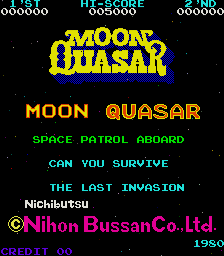
Play Moon Quasar online. Watch fuel and surviving ship sections as the alien waves give way to docking and refuelling encounters.
Browser play
Arcade — EmulatorJS controls
Default Player 1 keyboard mapping. Change keys in Controller Settings.
| Console button | Keyboard |
|---|---|
| ↑ / ↓ / ← / → | ↑ / ↓ / ← / → |
| RetroPad A / B / X / Y | Z / X / A / S |
| L / R | Q / E |
| Insert coin | V |
| START | Enter |
Open Controller Settings to configure your keyboard or gamepad. Touch controls are available on mobile.
How to Play Moon Quasar
Quick start
- Move into a clear lane beneath the alien wave.
- Fire while watching the fuel supply and ship sections.
- Survive the attack formation.
- Complete the docking or refuelling encounter that follows.
Controls
Use Left and Right to move and Fire 1 to shoot. Cocktail play uses an equivalent second control set.
Moon Quasar — About this game
Moon Quasar gives the segmented spacecraft another resource to watch between alien formations: fuel. The sections can be joined through docking to improve their combined firepower, but keeping them in action also calls for a refuelling rendezvous with a mothership. This encounter reverses the familiar docking approach as the craft moves upward to meet it. Surviving the next wave therefore depends on both avoiding the diving enemies and handling the intervening manoeuvre.
Cheats
Infinite Fuel
1 "开启", 0, 0x8087, 0xF8Player verification and sources
Browser play was reviewed before this edition was published in the catalogue. The date below is the catalogue publication date, not the game’s original release date.
- Browser test and catalogue publication date
- Browsers and devices
- PC: Chrome, Edge and Firefox. Mobile: Chrome on Android and Safari on iPhone and iPad.
- Player engine and core
- EmulatorJS 4.3.0-pre · arcade
- Tested by
- rwEmulator
Sources and editorial basis
rwEmulator reviews edition metadata, release information, game manuals and first-hand browser-play notes. Available manuals are linked below; the editorial policy explains how facts are checked and corrections are handled.