More browsing paths
Play Mr. TNT (English) Online
Mr. TNT
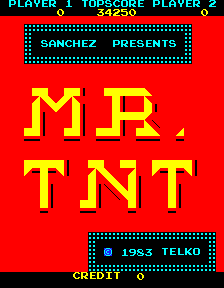
Play Mr. TNT online. Collect the dynamite while removing paths that send pursuing fuses into dead ends.
Browser play
Arcade — EmulatorJS controls
Default Player 1 keyboard mapping. Change keys in Controller Settings.
| Console button | Keyboard |
|---|---|
| ↑ / ↓ / ← / → | ↑ / ↓ / ← / → |
| RetroPad A / B / X / Y | Z / X / A / S |
| L / R | Q / E |
| Insert coin | V |
| START | Enter |
Open Controller Settings to configure your keyboard or gamepad. Touch controls are available on mobile.
How to Play Mr. TNT
Quick start
- Follow a route toward a dynamite stick.
- Watch which grid segments disappear behind you.
- Leave a path that traps a pursuing fuse at a dead end.
- Collect all sticks or exhaust all fuses to clear the grid.
Controls
Steer along the grid to collect dynamite. Travel erases route segments, so plan the next turn before committing to a path. A fuse burns out at a dead end; collect every stick or eliminate all fuses to finish the grid.
Mr. TNT — About this game
Mr. TNT makes movement erase the grid beneath the player. Sixteen sticks of dynamite lie along its routes, while lit fuses pursue through the same disappearing network. A fuse that reaches a dead end burns out, so planning which paths remain can be as useful as collecting another stick. Taking all the dynamite or eliminating every fuse finishes the grid.
Cheats
Infinite Lives PL1
1 "开启", 0, 0x4CA6, 0x09Infinite Lives PL2
1 "开启", 0, 0x4CA7, 0x09Player verification and sources
Browser play was reviewed before this edition was published in the catalogue. The date below is the catalogue publication date, not the game’s original release date.
- Browser test and catalogue publication date
- Browsers and devices
- PC: Chrome, Edge and Firefox. Mobile: Chrome on Android and Safari on iPhone and iPad.
- Player engine and core
- EmulatorJS 4.3.0-pre · arcade
- Tested by
- rwEmulator
Sources and editorial basis
rwEmulator reviews edition metadata, release information, game manuals and first-hand browser-play notes. Available manuals are linked below; the editorial policy explains how facts are checked and corrections are handled.