More browsing paths
Play NeoGeo 3D! (HB, Demo) Online
NeoGeo 3D! (HB, Demo)
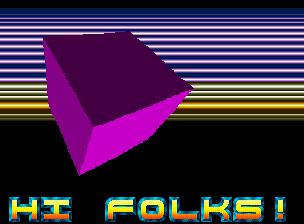
Play NeoGeo 3D! (HB, Demo) online. View Oxygene’s Neo Geo demo of a rotating vector cube, moving colour bars and adapted Atari ST music.
Browser play
Arcade — EmulatorJS controls
Default Player 1 keyboard mapping. Change keys in Controller Settings.
| Console button | Keyboard |
|---|---|
| ↑ / ↓ / ← / → | ↑ / ↓ / ← / → |
| RetroPad A / B / X / Y | Z / X / A / S |
| L / R | Q / E |
| Insert coin | V |
| START | Enter |
Open Controller Settings to configure your keyboard or gamepad. Touch controls are available on mobile.
How to Play NeoGeo 3D! (HB, Demo)
Quick start
- Start the demo.
- View the rotating vector cube and moving colour bars.
- Listen to the adapted Atari ST music.
- Use an available input only if the demo presents an interactive response.
Controls
The Neo Geo registration exposes a four-way joystick and Buttons A, B, C and D. This is a technical demo, so no unsupported gameplay function is assigned to those inputs.
NeoGeo 3D! (HB, Demo) — About this game
NeoGeo 3D! (HB, Demo) is Oxygene’s 2012 demoscene production for Neo Geo. Its showcase includes a rotating filled-vector cube, vertically displaced colour bars and Atari ST music adapted to the system’s sound hardware. Programmer Leonard describes the work as a collection of technical tricks, and Furrtek tested it on real MVS and Neo Geo CD hardware. The music and changing shapes form the presentation, so viewing the effects is the purpose of the program rather than completing an arcade score challenge.
Cheats
No cheats have been added for this edition.
Player verification and sources
Browser play was reviewed before this edition was published in the catalogue. The date below is the catalogue publication date, not the game’s original release date.
- Browser test and catalogue publication date
- Browsers and devices
- PC: Chrome, Edge and Firefox. Mobile: Chrome on Android and Safari on iPhone and iPad.
- Player engine and core
- EmulatorJS 4.3.0-pre · arcade
- Tested by
- rwEmulator
Sources and editorial basis
rwEmulator reviews edition metadata, release information, game manuals and first-hand browser-play notes. Available manuals are linked below; the editorial policy explains how facts are checked and corrections are handled.