More browsing paths
Play Pochi and Nyaa (Ver 2.02) (Revision 2.02 · Japanese) Online
Pochi and Nyaa (Ver 2.02)
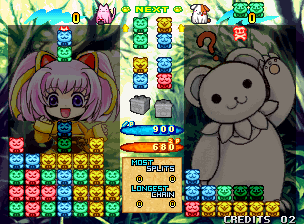
Play Pochi and Nyaa (Ver 2.02) online. Build connected colour groups and turn a falling piece into a trigger when the attack is ready.
Browser play
Arcade — EmulatorJS controls
Default Player 1 keyboard mapping. Change keys in Controller Settings.
| Console button | Keyboard |
|---|---|
| ↑ / ↓ / ← / → | ↑ / ↓ / ← / → |
| RetroPad A / B / X / Y | Z / X / A / S |
| L / R | Q / E |
| Insert coin | V |
| START | Enter |
Open Controller Settings to configure your keyboard or gamepad. Touch controls are available on mobile.
How to Play Pochi and Nyaa (Ver 2.02)
Quick start
- Position and rotate the falling pair.
- Connect more pieces of a matching colour.
- Use the trigger action to change a falling piece into a spike.
- Set off the group before the stack reaches the skull limit.
Controls
Directional control: position the pieces. Separate rotation actions turn them left or right. Trigger action: change a falling piece into a spike to clear the connected colour group.
Pochi and Nyaa (Ver 2.02) — About this game
Pochi and Nyaa (Ver 2.02) lets the player accumulate connected pieces of one colour before choosing when to clear them. A falling piece can be changed into a spiky trigger, which starts the removal when it reaches the matching group. Longer connections and branches increase the resulting attack against the opponent, sending nuisance pieces into their field. Waiting allows a larger structure to grow, but also uses the room needed for the next pieces. Reaching the skull-marked limit ends the attempt.
Cheats
Flood The Opponent (Vs Mode) PL1
1 "开启", 0, 0x102C15, 0x55Max Intruders (Attack Mode)
1 "开启", 0, 0x10C82A, 0x10, 0, 0x10C82B, 0xFFSelect Cartridge/ NeoGeo Type
1 "街机 (MVS)", 0, 0x10FD82, 0x80
2 "家机 (NEOGEO)", 0, 0x10FD82, 0x00Player verification and sources
Browser play was reviewed before this edition was published in the catalogue. The date below is the catalogue publication date, not the game’s original release date.
- Browser test and catalogue publication date
- Browsers and devices
- PC: Chrome, Edge and Firefox. Mobile: Chrome on Android and Safari on iPhone and iPad.
- Player engine and core
- EmulatorJS 4.3.0-pre · arcade
- Tested by
- rwEmulator
Sources and editorial basis
rwEmulator reviews edition metadata, release information, game manuals and first-hand browser-play notes. Available manuals are linked below; the editorial policy explains how facts are checked and corrections are handled.