More browsing paths
Play Pulstar (alternate board) Online
Pulstar (alternate board)
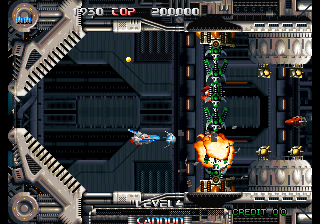
Play Pulstar (alternate board) online. Use charged fire and a protective drone, or sacrifice the drone for an immediate bomb attack.
Browser play
Arcade — EmulatorJS controls
Default Player 1 keyboard mapping. Change keys in Controller Settings.
| Console button | Keyboard |
|---|---|
| ↑ / ↓ / ← / → | ↑ / ↓ / ← / → |
| RetroPad A / B / X / Y | Z / X / A / S |
| L / R | Q / E |
| Insert coin | V |
| START | Enter |
Open Controller Settings to configure your keyboard or gamepad. Touch controls are available on mobile.
How to Play Pulstar (alternate board)
Quick start
- Learn the forward shot.
- Hold the firing button for a charged attack.
- Collect and position the protective drone.
- Compare keeping its shield with spending it as a bomb.
Controls
Fire ordinary shots or hold the firing button to charge the attack. A collected drone provides protection and contact damage; the drone can also be sacrificed for its bomb attack.
Pulstar (alternate board) — About this game
Pulstar (alternate board) moves the Dino246 through eight stages of enemies and obstacles with a forward gun and a charged attack. A collected auxiliary drone shields the craft from ordinary incoming fire and can damage smaller enemies by contact. Sacrificing that drone creates a bomb attack, trading its continuing protection for an immediate explosion. Other pickups add speed and supporting fire, while the stage boss closes each section.
Cheats
No cheats have been added for this edition.
Player verification and sources
Browser play was reviewed before this edition was published in the catalogue. The date below is the catalogue publication date, not the game’s original release date.
- Browser test and catalogue publication date
- Browsers and devices
- PC: Chrome, Edge and Firefox. Mobile: Chrome on Android and Safari on iPhone and iPad.
- Player engine and core
- EmulatorJS 4.3.0-pre · arcade
- Tested by
- rwEmulator
Sources and editorial basis
rwEmulator reviews edition metadata, release information, game manuals and first-hand browser-play notes. Available manuals are linked below; the editorial policy explains how facts are checked and corrections are handled.