More browsing paths
Play VS Mahjong Otome Ryouran (revision 1) (Revision 1 · English) Online
VS Mahjong Otome Ryouran (revision 1)
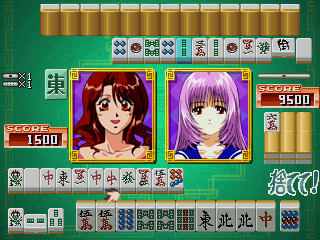
Play VS Mahjong Otome Ryouran (revision 1) online. Select a character for the joystick-controlled mahjong encounters.
Browser play
Arcade — EmulatorJS controls
Default Player 1 keyboard mapping. Change keys in Controller Settings.
| Console button | Keyboard |
|---|---|
| ↑ / ↓ / ← / → | ↑ / ↓ / ← / → |
| RetroPad A / B / X / Y | Z / X / A / S |
| L / R | Q / E |
| Insert coin | V |
| START | Enter |
Open Controller Settings to configure your keyboard or gamepad. Touch controls are available on mobile.
How to Play VS Mahjong Otome Ryouran (revision 1)
Quick start
- Observa la mano y la ficha que está marcada.
- Usa izquierda o derecha para seleccionar la ficha.
- Pulsa A para confirmar la elección.
- Usa B para cancelar y revisar la selección.
Controls
Izquierda/derecha: seleccionar ficha. A: confirmar. B: cancelar.
VS Mahjong Otome Ryouran (revision 1) — About this game
VS Mahjong Otome Ryouran (revision 1) presents its mahjong matches through selectable illustrated characters and anime sequences. Its interface uses an eight-way joystick with two actions rather than a full mahjong key panel. The character selection establishes the presentation for play, while the tile-game decisions are made through the smaller action-game style control set.
Cheats
No cheats have been added for this edition.
Player verification and sources
Browser play was reviewed before this edition was published in the catalogue. The date below is the catalogue publication date, not the game’s original release date.
- Browser test and catalogue publication date
- Browsers and devices
- PC: Chrome, Edge and Firefox. Mobile: Chrome on Android and Safari on iPhone and iPad.
- Player engine and core
- EmulatorJS 4.3.0-pre · arcade
- Tested by
- rwEmulator
Sources and editorial basis
rwEmulator reviews edition metadata, release information, game manuals and first-hand browser-play notes. Available manuals are linked below; the editorial policy explains how facts are checked and corrections are handled.