More browsing paths
Play Slap Fight (A76 set, GX-006-A PCB) (Japanese) Online
Slap Fight (A76 set, GX-006-A PCB)
Play Slap Fight (A76 set, GX-006-A PCB) online. Collect stars until the desired equipment is highlighted, then use Weapon Selection to install it.
Browser play
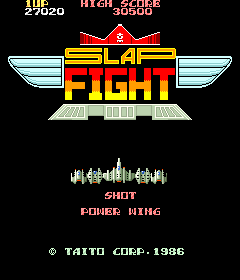
Arcade — EmulatorJS controls
Default Player 1 keyboard mapping. Change keys in Controller Settings.
| Console button | Keyboard |
|---|---|
| ↑ / ↓ / ← / → | ↑ / ↓ / ← / → |
| RetroPad A / B / X / Y | Z / X / A / S |
| L / R | Q / E |
| Insert coin | V |
| START | Enter |
Open Controller Settings to configure your keyboard or gamepad. Touch controls are available on mobile.
How to Play Slap Fight (A76 set, GX-006-A PCB)
Quick start
- Fire at an enemy carrying a star.
- Collect the star and check the gauge highlight.
- Take more stars if a later power-up is wanted.
- Press Weapon Selection when the needed equipment is highlighted.
Controls
Move with the joystick and use Shot to attack. Collect stars to advance the gauge, then press Weapon Selection to equip the highlighted entry and reset it. Bomb is a selected weapon type in this game, rather than a separate stocked emergency-bomb action.
Slap Fight (A76 set, GX-006-A PCB) — About this game
Slap Fight (A76 set, GX-006-A PCB) ties each equipment choice to stars collected from destroyed enemies. Every star moves the highlighted entry along a power-up gauge, and Weapon Selection installs that entry before resetting the gauge. Speed, side fire, wings, different guns and a shield therefore compete for the same sequence of pickups. Choosing an early improvement can make the next section safer, while waiting reaches stronger equipment farther along the list.
Slap Fight (A76 set, GX-006-A PCB) Game manuals
Cheats
No cheats have been added for this edition.
Player verification and sources
Browser play was reviewed before this edition was published in the catalogue. The date below is the catalogue publication date, not the game’s original release date.
- Browser test and catalogue publication date
- Browsers and devices
- PC: Chrome, Edge and Firefox. Mobile: Chrome on Android and Safari on iPhone and iPad.
- Player engine and core
- EmulatorJS 4.3.0-pre · arcade
- Tested by
- rwEmulator
Sources and editorial basis
rwEmulator reviews edition metadata, release information, game manuals and first-hand browser-play notes. Available manuals are linked below; the editorial policy explains how facts are checked and corrections are handled.