More browsing paths
Play Soldam (English) Online
Soldam
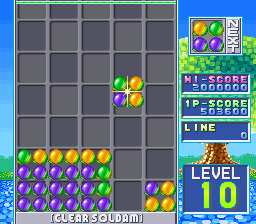
Play Soldam online. Rotate four-fruit squares and enclose colours to build full matching rows.
Browser play
Arcade — EmulatorJS controls
Default Player 1 keyboard mapping. Change keys in Controller Settings.
| Console button | Keyboard |
|---|---|
| ↑ / ↓ / ← / → | ↑ / ↓ / ← / → |
| RetroPad A / B / X / Y | Z / X / A / S |
| L / R | Q / E |
| Insert coin | V |
| START | Enter |
Open Controller Settings to configure your keyboard or gamepad. Touch controls are available on mobile.
How to Play Soldam
Quick start
- Inspect the colours of the falling four-fruit square.
- Rotate it toward a useful pair of matching ends.
- Drop it to convert enclosed fruits.
- Complete a single-colour row before the field fills.
Controls
レバーで落下する実を移動し、二つの回転ボタンで左回転と右回転を使い分けます。実が接地した時に、縦、横、斜めで同色に挟まれた実が色を変えます。横一列を同色にして消すことが目的です。
Soldam — About this game
Soldam drops rotating squares of four fruits into a colour-changing puzzle. Matching end colours can convert the fruits between them along horizontal, vertical or diagonal lines, making the landing position more than a simple place to stack a block. A whole row of one colour clears from the field. Plan which pair of end fruits will enclose another colour before dropping the square, then check whether the conversion will complete a row or merely raise the pile. Keeping space near the top allows another useful arrangement when the next colours arrive.
Cheats
No cheats have been added for this edition.
Player verification and sources
Browser play was reviewed before this edition was published in the catalogue. The date below is the catalogue publication date, not the game’s original release date.
- Browser test and catalogue publication date
- Browsers and devices
- PC: Chrome, Edge and Firefox. Mobile: Chrome on Android and Safari on iPhone and iPad.
- Player engine and core
- EmulatorJS 4.3.0-pre · arcade
- Tested by
- rwEmulator
Sources and editorial basis
rwEmulator reviews edition metadata, release information, game manuals and first-hand browser-play notes. Available manuals are linked below; the editorial policy explains how facts are checked and corrections are handled.