More browsing paths
Play Subroc-3D (English) Online
Subroc-3D
Play Subroc-3D online. Adjust position and elevation, shoot approaching enemies and hit the command ship’s barrier in its centre.
Browser play
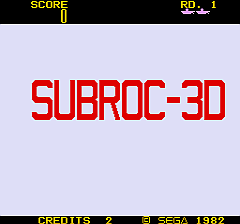
Arcade — EmulatorJS controls
Default Player 1 keyboard mapping. Change keys in Controller Settings.
| Console button | Keyboard |
|---|---|
| ↑ / ↓ / ← / → | ↑ / ↓ / ← / → |
| RetroPad A / B / X / Y | Z / X / A / S |
| L / R | Q / E |
| Insert coin | V |
| START | Enter |
Open Controller Settings to configure your keyboard or gamepad. Touch controls are available on mobile.
How to Play Subroc-3D
Quick start
- Move the view sideways to line up a target.
- Adjust elevation to meet enemies above or below.
- Fire before the attackers close in.
- Hit the barrier in its centre, then destroy the command ship.
Controls
Side-to-side control: move the view horizontally. Elevation controls: move up or down. Fire: shoot the target in the sights.
Subroc-3D — About this game
Subroc-3D places its craft behind a periscope view, with enemies approaching at different elevations. Moving sideways changes the line of attack, while the elevation controls shift the craft up and down between the battle areas. Enemy craft and missiles must be dealt with before they close in. A barrier protects the command ship and must be hit in its centre before that ship can be destroyed. Defeating it finishes the round and adds the remaining bonus to the score.
Subroc-3D Game manuals
Cheats
No cheats have been added for this edition.
Player verification and sources
Browser play was reviewed before this edition was published in the catalogue. The date below is the catalogue publication date, not the game’s original release date.
- Browser test and catalogue publication date
- Browsers and devices
- PC: Chrome, Edge and Firefox. Mobile: Chrome on Android and Safari on iPhone and iPad.
- Player engine and core
- EmulatorJS 4.3.0-pre · arcade
- Tested by
- rwEmulator
Sources and editorial basis
rwEmulator reviews edition metadata, release information, game manuals and first-hand browser-play notes. Available manuals are linked below; the editorial policy explains how facts are checked and corrections are handled.