More browsing paths
Play Tel Jan (English) Online
Tel Jan
Play Tel Jan online. Elige fichas con izquierda y derecha, confirma con A o cancela la selección con B.
Browser play
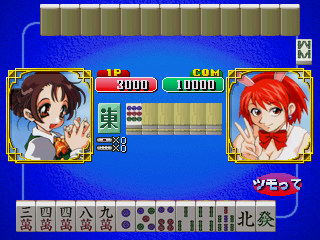
Arcade — EmulatorJS controls
Default Player 1 keyboard mapping. Change keys in Controller Settings.
| Console button | Keyboard |
|---|---|
| ↑ / ↓ / ← / → | ↑ / ↓ / ← / → |
| RetroPad A / B / X / Y | Z / X / A / S |
| L / R | Q / E |
| Insert coin | V |
| START | Enter |
Open Controller Settings to configure your keyboard or gamepad. Touch controls are available on mobile.
How to Play Tel Jan
Quick start
- Observa la mano y la ficha que está marcada.
- Usa izquierda o derecha para seleccionar la ficha.
- Pulsa A para confirmar la elección.
- Usa B para cancelar y revisar la selección.
Controls
Izquierda/derecha: seleccionar ficha. A: confirmar. B: cancelar.
Tel Jan — About this game
Tel Jan presenta sus decisiones de mahjong mediante una interfaz de selección con palanca. Izquierda y derecha cambian la ficha marcada; A confirma la elección y B la cancela. La separación entre seleccionar y confirmar permite revisar una decisión antes de ejecutarla. En esta edición arcade de 1999, empieza por identificar la ficha señalada y comprueba la acción que vas a realizar durante la mano antes de pulsar el botón de confirmación.
Cheats
No cheats have been added for this edition.
Player verification and sources
Browser play was reviewed before this edition was published in the catalogue. The date below is the catalogue publication date, not the game’s original release date.
- Browser test and catalogue publication date
- Browsers and devices
- PC: Chrome, Edge and Firefox. Mobile: Chrome on Android and Safari on iPhone and iPad.
- Player engine and core
- EmulatorJS 4.3.0-pre · arcade
- Tested by
- rwEmulator
Sources and editorial basis
rwEmulator reviews edition metadata, release information, game manuals and first-hand browser-play notes. Available manuals are linked below; the editorial policy explains how facts are checked and corrections are handled.