More browsing paths
Play Tetris (bootleg) (Hack) Online
Tetris (bootleg)
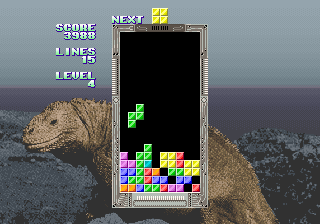
Play Tetris (bootleg) online. Complete rows in Sega’s 1988 Tetris, planning around one-piece preview and rotation without wall kicks.
Browser play
Arcade — EmulatorJS controls
Default Player 1 keyboard mapping. Change keys in Controller Settings.
| Console button | Keyboard |
|---|---|
| ↑ / ↓ / ← / → | ↑ / ↓ / ← / → |
| RetroPad A / B / X / Y | Z / X / A / S |
| L / R | Q / E |
| Insert coin | V |
| START | Enter |
Open Controller Settings to configure your keyboard or gamepad. Touch controls are available on mobile.
How to Play Tetris (bootleg)
Quick start
- Check the current piece and next preview.
- Move and rotate into an open placement.
- Press Down to lower it faster after choosing the position.
- Clear full rows and keep space for future rotations.
Controls
Left and Right move the piece; Rotate changes its orientation; Down accelerates its descent. This edition has no hold function, instant hard drop or wall kicks.
Tetris (bootleg) — About this game
Sega’s 1988 Tetris asks the player to build complete horizontal rows while the falling pieces accelerate. One preview piece helps plan the next placement, but this version has neither a hold slot nor an instant hard drop. Its Sega rotation system also lacks wall kicks, so a piece cannot be expected to rotate out of a tight space the way it might in a later game. Keep room around a planned turn and lower a piece only once its orientation is settled. Completed rows disappear and reduce the stack, leaving more room for the next group of pieces.
Cheats
Selecting the current shape is always PL1
1 "绿色", 0, 0xFFC009, 0x01
2 "紫色", 0, 0xFFC009, 0x02
3 "黄色", 0, 0xFFC009, 0x03
4 "青色", 0, 0xFFC009, 0x04
5 "橙色", 0, 0xFFC009, 0x05
6 "蓝色", 0, 0xFFC009, 0x06
7 "红色", 0, 0xFFC009, 0x07
Select the current temporary shape PL1
1 "绿色", 0, 0xFFC009, 0x01
2 "紫色", 0, 0xFFC009, 0x02
3 "黄色", 0, 0xFFC009, 0x03
4 "青色", 0, 0xFFC009, 0x04
5 "橙色", 0, 0xFFC009, 0x05
6 "蓝色", 0, 0xFFC009, 0x06
7 "红色", 0, 0xFFC009, 0x07
Selecting the next shape is always PL1
1 "绿色", 0, 0xFFE321, 0x01
2 "紫色", 0, 0xFFE321, 0x02
3 "黄色", 0, 0xFFE321, 0x03
4 "青色", 0, 0xFFE321, 0x04
5 "橙色", 0, 0xFFE321, 0x05
6 "蓝色", 0, 0xFFE321, 0x06
7 "红色", 0, 0xFFE321, 0x07
Select the temporary next shape PL1
1 "绿色", 0, 0xFFE321, 0x01
2 "紫色", 0, 0xFFE321, 0x02
3 "黄色", 0, 0xFFE321, 0x03
4 "青色", 0, 0xFFE321, 0x04
5 "橙色", 0, 0xFFE321, 0x05
6 "蓝色", 0, 0xFFE321, 0x06
7 "红色", 0, 0xFFE321, 0x07
Selecting the current shape is always PL2
1 "绿色", 0, 0xFFC409, 0x01
2 "紫色", 0, 0xFFC409, 0x02
3 "黄色", 0, 0xFFC409, 0x03
4 "青色", 0, 0xFFC409, 0x04
5 "橙色", 0, 0xFFC409, 0x05
6 "蓝色", 0, 0xFFC409, 0x06
7 "红色", 0, 0xFFC409, 0x07
Select the current temporary shape PL2
1 "绿色", 0, 0xFFC409, 0x01
2 "紫色", 0, 0xFFC409, 0x02
3 "黄色", 0, 0xFFC409, 0x03
4 "青色", 0, 0xFFC409, 0x04
5 "橙色", 0, 0xFFC409, 0x05
6 "蓝色", 0, 0xFFC409, 0x06
7 "红色", 0, 0xFFC409, 0x07
Selecting the next shape is always PL2
1 "绿色", 0, 0xFFE3A1, 0x01
2 "紫色", 0, 0xFFE3A1, 0x02
3 "黄色", 0, 0xFFE3A1, 0x03
4 "青色", 0, 0xFFE3A1, 0x04
5 "橙色", 0, 0xFFE3A1, 0x05
6 "蓝色", 0, 0xFFE3A1, 0x06
7 "红色", 0, 0xFFE3A1, 0x07
Select the temporary next shape PL2
1 "绿色", 0, 0xFFE3A1, 0x01
2 "紫色", 0, 0xFFE3A1, 0x02
3 "黄色", 0, 0xFFE3A1, 0x03
4 "青色", 0, 0xFFE3A1, 0x04
5 "橙色", 0, 0xFFE3A1, 0x05
6 "蓝色", 0, 0xFFE3A1, 0x06
7 "红色", 0, 0xFFE3A1, 0x07
manual control mode PL1
1 "开启", 0, 0xFFC00C, 0x00Manual Control Mode PL2
1 "开启", 0, 0xFFC40C, 0x00Player verification and sources
Browser play was reviewed before this edition was published in the catalogue. The date below is the catalogue publication date, not the game’s original release date.
- Browser test and catalogue publication date
- Browsers and devices
- PC: Chrome, Edge and Firefox. Mobile: Chrome on Android and Safari on iPhone and iPad.
- Player engine and core
- EmulatorJS 4.3.0-pre · arcade
- Tested by
- rwEmulator
Sources and editorial basis
rwEmulator reviews edition metadata, release information, game manuals and first-hand browser-play notes. Available manuals are linked below; the editorial policy explains how facts are checked and corrections are handled.