More browsing paths
Play Task Force Harrier (US) (US edition · English) Online
Task Force Harrier (US)
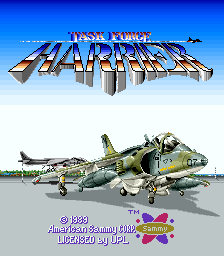
Play Task Force Harrier (US) online. Use separate air and ground attacks and change escort formations to adjust fire coverage and speed.
Browser play
Arcade — EmulatorJS controls
Default Player 1 keyboard mapping. Change keys in Controller Settings.
| Console button | Keyboard |
|---|---|
| ↑ / ↓ / ← / → | ↑ / ↓ / ← / → |
| RetroPad A / B / X / Y | Z / X / A / S |
| L / R | Q / E |
| Insert coin | V |
| START | Enter |
Open Controller Settings to configure your keyboard or gamepad. Touch controls are available on mobile.
How to Play Task Force Harrier (US)
Quick start
- Fire at an approaching aircraft.
- Use the ground attack on a tank or turret.
- Collect an escort upgrade.
- Compare how the escort formations affect fire coverage and movement.
Controls
Move the Harrier and use its air and ground weapons against the corresponding enemies. Collect power-ups and escorts. Changing escort formation affects both the shot pattern and manoeuvring speed.
Task Force Harrier (US) — About this game
Task Force Harrier (US) divides the aircraft’s fire between airborne opponents and ground defences. Gunfire deals with planes and helicopters while the bomb-type attack reaches tanks and turrets. Collected escort fighters extend the attack, and changing their formation changes both the shot pattern and manoeuvring speed. The choice of formation therefore affects how the Harrier approaches the next group as well as how much ground it covers.
Cheats
No cheats have been added for this edition.
Player verification and sources
Browser play was reviewed before this edition was published in the catalogue. The date below is the catalogue publication date, not the game’s original release date.
- Browser test and catalogue publication date
- Browsers and devices
- PC: Chrome, Edge and Firefox. Mobile: Chrome on Android and Safari on iPhone and iPad.
- Player engine and core
- EmulatorJS 4.3.0-pre · arcade
- Tested by
- rwEmulator
Sources and editorial basis
rwEmulator reviews edition metadata, release information, game manuals and first-hand browser-play notes. Available manuals are linked below; the editorial policy explains how facts are checked and corrections are handled.