More browsing paths
Play Zero Wing (2P set) (English) Online
Zero Wing (2P set)
Play Zero Wing (2P set) online. Hold the tractor beam to capture a small enemy, then keep it as protection or launch it into the next formation.
Browser play
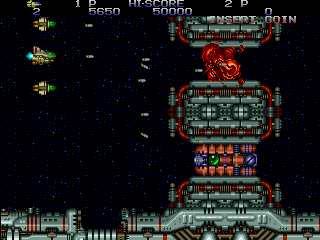
Arcade — EmulatorJS controls
Default Player 1 keyboard mapping. Change keys in Controller Settings.
| Console button | Keyboard |
|---|---|
| ↑ / ↓ / ← / → | ↑ / ↓ / ← / → |
| RetroPad A / B / X / Y | Z / X / A / S |
| L / R | Q / E |
| Insert coin | V |
| START | Enter |
Open Controller Settings to configure your keyboard or gamepad. Touch controls are available on mobile.
How to Play Zero Wing (2P set)
Quick start
- Move the ZIG and use Shot against the opening enemies.
- Hold Tractor Beam near a suitable small enemy.
- Keep the captured enemy in front as a shield.
- Press Tractor Beam again to launch it when the next target approaches.
Controls
Move with the eight-way joystick. Shot fires the selected weapon. Hold Tractor Beam to capture a suitable small enemy or retrieve an item; press it with an enemy held to launch that enemy forward. Captured enemies can protect the front of the ship. Collect matching weapon colours to improve the chosen attack.
Zero Wing (2P set) — About this game
Zero Wing (2P set) lets its spacecraft turn a small enemy into equipment. Holding the tractor beam captures a suitable target, which can remain in front as a shield or be launched into another enemy. The beam can also retrieve supplies, adding another way to reach a useful item. Colour pickups select a forward cannon, laser or homing missiles, with repeated matching colours increasing their power. Capturing and keeping a shield therefore changes both the approach to the next formation and the moment to spend that shield as an attack.
Cheats
Infinite Lives
1 "开启", 0, 0x818B3, 0x63Always Maximu Power
1 "开启", 0, 0x80F51, 0x03always maximum speed
1 "开启", 0, 0x80007, 0x30Select Weapon
1 "普通", 0, 0x80029, 0x00
2 "激光", 0, 0x80029, 0x01
3 "导弹", 0, 0x80029, 0x02Player verification and sources
Browser play was reviewed before this edition was published in the catalogue. The date below is the catalogue publication date, not the game’s original release date.
- Browser test and catalogue publication date
- Browsers and devices
- PC: Chrome, Edge and Firefox. Mobile: Chrome on Android and Safari on iPhone and iPad.
- Player engine and core
- EmulatorJS 4.3.0-pre · arcade
- Tested by
- rwEmulator
Sources and editorial basis
rwEmulator reviews edition metadata, release information, game manuals and first-hand browser-play notes. Available manuals are linked below; the editorial policy explains how facts are checked and corrections are handled.