More browsing paths
Play Zodiack (English) Online
Zodiack
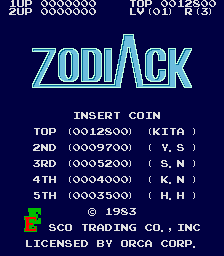
Play Zodiack online. Survive the flight, attack the eight units when their colours change and land near the base’s centre.
Browser play
Arcade — EmulatorJS controls
Default Player 1 keyboard mapping. Change keys in Controller Settings.
| Console button | Keyboard |
|---|---|
| ↑ / ↓ / ← / → | ↑ / ↓ / ← / → |
| RetroPad A / B / X / Y | Z / X / A / S |
| L / R | Q / E |
| Insert coin | V |
| START | Enter |
Open Controller Settings to configure your keyboard or gamepad. Touch controls are available on mobile.
How to Play Zodiack
Quick start
- Move and fire through the scrolling enemies and blocks.
- At the Goke, watch the eight surrounding units.
- Shoot each unit while its changed colour exposes it.
- Guide the return toward the centre of the landing base.
Controls
Directional control: guide the Zogram during flight and landing. Fire action: shoot enemies; the Goke’s surrounding units are vulnerable only during their colour changes.
Zodiack — About this game
Zodiack alternates a scrolling flight with a fixed-screen attack on a larger enemy. The Zogram first leaves its base and fights through hostile craft and blocks, where a collision ends the flight. Reaching the Goke changes the task: its eight surrounding Mitiohro units can be damaged only during their brief colour changes. Destroying them allows a landing attempt back at the base. Landing closer to the centre improves the bonus, so the return requires care as well as the outward battle.
Cheats
No cheats have been added for this edition.
Player verification and sources
Browser play was reviewed before this edition was published in the catalogue. The date below is the catalogue publication date, not the game’s original release date.
- Browser test and catalogue publication date
- Browsers and devices
- PC: Chrome, Edge and Firefox. Mobile: Chrome on Android and Safari on iPhone and iPad.
- Player engine and core
- EmulatorJS 4.3.0-pre · arcade
- Tested by
- rwEmulator
Sources and editorial basis
rwEmulator reviews edition metadata, release information, game manuals and first-hand browser-play notes. Available manuals are linked below; the editorial policy explains how facts are checked and corrections are handled.