More browsing paths
Play Arthur's Absolutely Fun Day (US edition · English) Online
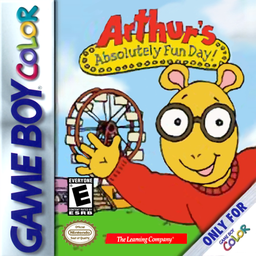
Arthur's Absolutely Fun Day!
Play Arthur's Absolutely Fun Day online on Game Boy Color. Help Arthur earn sixteen stars for a Wonder World ticket by playing activities around Elwood City. Walk to an activity, try its particular skill and return to the town to choose another challenge in whatever order you prefer.
Browser play
Game Boy Color (GBC) — EmulatorJS controls
Default Player 1 keyboard mapping. Change keys in Controller Settings.
| Console button | Keyboard |
|---|---|
| ↑ / ↓ / ← / → | ↑ / ↓ / ← / → |
| A / B | Z / X |
| START / SELECT | Enter / V |
Open Controller Settings to configure your keyboard or gamepad. Touch controls are available on mobile.
How to Play Arthur's Absolutely Fun Day
Quick start
Explore town, press A at an activity entrance and read its instructions. Earn stars toward the ticket, then visit the amusement park for more activities.
Controls
D-pad moves Arthur; A enters an activity. Basketball: Left/Right changes distance, Down crouches, hold/release A shoots. Pancakes use A to flip/remove. On the town map SELECT then B shows the password.
Arthur's Absolutely Fun Day — About this game
Look for Arthur's bright eyes and thought bubble when an activity can be entered. Start with basketball to learn how holding and releasing A changes a shot, or practise flipping pancakes when bubbles appear. Repeating activities raises the challenge; record the school-bus character password to continue later.
Arthur's Absolutely Fun Day Game manuals
Cheats
No cheats have been added for this edition.
Player verification and sources
Browser play was reviewed before this edition was published in the catalogue. The date below is the catalogue publication date, not the game’s original release date.
- Browser test and catalogue publication date
- Browsers and devices
- PC: Chrome, Edge and Firefox. Mobile: Chrome on Android and Safari on iPhone and iPad.
- Player engine and core
- EmulatorJS 4.3.0-pre · gb
- Tested by
- rwEmulator
Sources and editorial basis
rwEmulator reviews edition metadata, release information, game manuals and first-hand browser-play notes. Available manuals are linked below; the editorial policy explains how facts are checked and corrections are handled.