More browsing paths
Play Backyard Skateboarding (US edition) Online
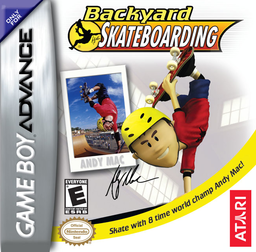
Backyard Skateboarding
Play Backyard Skateboarding online and take on neighborhood races, collection challenges, grinds, grabs and signature tricks in the GBA skate tour.
Browser play
Game Boy Advance (GBA) — EmulatorJS controls
Default Player 1 keyboard mapping. Change keys in Controller Settings.
| Console button | Keyboard |
|---|---|
| ↑ / ↓ / ← / → | ↑ / ↓ / ← / → |
| A / B | Z / X |
| L / R | Q / E |
| START / SELECT | Enter / V |
Open Controller Settings to configure your keyboard or gamepad. Touch controls are available on mobile.
How to Play Backyard Skateboarding
Quick start
Press START at the title screen and choose New Game to begin the Backyard Skate Tour. Only the Neighborhood is open at first: meet the local kids, accept their challenges, and complete races or collection tasks to unlock more areas. Build the Juice Meter with tricks before trying signature moves, and watch the balance meter while grinding or performing lip tricks.
Controls
D-Pad: move the skater and navigate menus; A: ollie/flip trick, confirm; B: grind, talk, cancel; L: switch stance; R: grab trick; SELECT: restart the current challenge; START: pause. From Pause, Exit opens the save prompt; Continue Game on the Main Menu resumes the tour.
Backyard Skateboarding Game manuals
Cheats
No cheats have been added for this edition.
Player verification and sources
Browser play was reviewed before this edition was published in the catalogue. The date below is the catalogue publication date, not the game’s original release date.
- Browser test and catalogue publication date
- Browsers and devices
- PC: Chrome, Edge and Firefox. Mobile: Chrome on Android and Safari on iPhone and iPad.
- Player engine and core
- EmulatorJS 4.3.0-pre · gba
- Tested by
- rwEmulator
Sources and editorial basis
rwEmulator reviews edition metadata, release information, game manuals and first-hand browser-play notes. Available manuals are linked below; the editorial policy explains how facts are checked and corrections are handled.