More browsing paths
Play Chicken Shoot (US edition · English / French / German / Spanish / Italian) Online
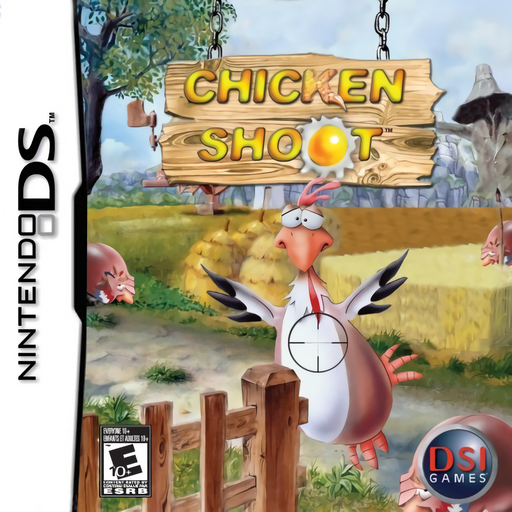
Chicken Shoot
Play Chicken Shoot online. Aim, reload and stop egg attacks in Arcade, Classic and Catch an Egg. See the Nintendo DS starting guide and controls.
Browser play
Nintendo DS (NDS) — EmulatorJS controls
Default Player 1 keyboard mapping. Change keys in Controller Settings.
| Console button | Keyboard |
|---|---|
| ↑ / ↓ / ← / → | ↑ / ↓ / ← / → |
| A / B / X / Y | Z / X / A / S |
| L / R | Q / E |
| START / SELECT | Enter / V |
| Microphone | Not assigned |
Open Controller Settings to configure your keyboard or gamepad. Touch controls are available on mobile.
How to Play Chicken Shoot
Quick start
Choose Arcade or Classic, practise aiming, firing and reloading, then watch for thrown eggs. Try Catch an Egg separately and move the basket under the falling egg.
Controls
Control Pad moves the crosshair, A fires and B reloads. L/R scroll the view and START pauses. In Catch an Egg use the pad to move the basket; check the selected mode's goal.
Chicken Shoot — About this game
Chicken Shoot presents a gallery of cartoon birds with a separate egg-catching game. Arcade and Classic ask you to shoot targets under different completion rules, so read the current goal and watch ammunition as well as the clock. Birds can throw eggs toward you; dealing with those attacks protects your health instead of simply adding score. Some scenery reacts to shots and pickups change the situation. Catch an Egg changes the task entirely to moving a basket beneath falling eggs. Learn the button layout in the opening scene before switching between the shooting and catching games.
Chicken Shoot Game manuals
Cheats
No cheats have been added for this edition.
Player verification and sources
Browser play was reviewed before this edition was published in the catalogue. The date below is the catalogue publication date, not the game’s original release date.
- Browser test and catalogue publication date
- Browsers and devices
- PC: Chrome, Edge and Firefox. Mobile: Chrome on Android and Safari on iPhone and iPad.
- Player engine and core
- EmulatorJS 4.3.0-pre · nds
- Tested by
- rwEmulator
Sources and editorial basis
rwEmulator reviews edition metadata, release information, game manuals and first-hand browser-play notes. Available manuals are linked below; the editorial policy explains how facts are checked and corrections are handled.