More browsing paths
Play Wacky Races (Japan edition · Japanese) Online
Chiki Chiki Machine Mou Race
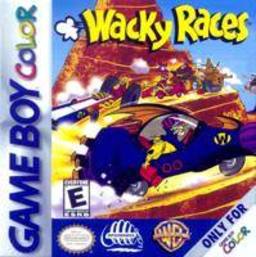
Play Wacky Races online on GBC. Race cartoon machines, use weapons and unlock more courses.
Browser play
Game Boy Color (GBC) — EmulatorJS controls
Default Player 1 keyboard mapping. Change keys in Controller Settings.
| Console button | Keyboard |
|---|---|
| ↑ / ↓ / ← / → | ↑ / ↓ / ← / → |
| A / B | Z / X |
| START / SELECT | Enter / V |
Open Controller Settings to configure your keyboard or gamepad. Touch controls are available on mobile.
How to Play Wacky Races
Quick start
Choose an available racer and course. Hold A to accelerate and steer with Left/Right; B uses the collected weapon. Begin by learning the bends, ease off before a tight turn and save a pickup until a rival is in a useful position.
Controls
Left/Right steers, A accelerates and B uses the collected weapon. Release A to reduce speed before a bend. START pauses; menus use the directional pad, A to confirm and B to return.
Wacky Races — About this game
The characters’ distinctive machines give the competition its cartoon flavour, while winning opens further courses. Weapons add another decision to steering and speed, because a useful pickup is best saved for a rival you can affect. First learn the corners, then combine clean driving and well-timed interference to work through the racing challenges.
Cheats
No cheats have been added for this edition.
Player verification and sources
Browser play was reviewed before this edition was published in the catalogue. The date below is the catalogue publication date, not the game’s original release date.
- Browser test and catalogue publication date
- Browsers and devices
- PC: Chrome, Edge and Firefox. Mobile: Chrome on Android and Safari on iPhone and iPad.
- Player engine and core
- EmulatorJS 4.3.0-pre · gb
- Tested by
- rwEmulator
Sources and editorial basis
rwEmulator reviews edition metadata, release information, game manuals and first-hand browser-play notes. Available manuals are linked below; the editorial policy explains how facts are checked and corrections are handled.