More browsing paths
Play Crash Bandicoot Purple: Ripto's Rampage (Japan edition) Online
Crash Bandicoot Advance: Wakuwaku Tomodachi Daisakusen!
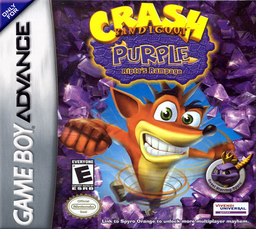
Play Crash Bandicoot Purple: Ripto's Rampage online. This is a Game Boy Advance game where you can enjoy story exploration, mini-games, and card collecting.
Browser play
Game Boy Advance (GBA) — EmulatorJS controls
Default Player 1 keyboard mapping. Change keys in Controller Settings.
| Console button | Keyboard |
|---|---|
| ↑ / ↓ / ← / → | ↑ / ↓ / ← / → |
| A / B | Z / X |
| L / R | Q / E |
| START / SELECT | Enter / V |
Open Controller Settings to configure your keyboard or gamepad. Touch controls are available on mobile.
How to Play Crash Bandicoot Purple: Ripto's Rampage
Quick start
Press START on the title and select one of the three save frames with A to start Story Mode. Explore the first world, talk to the inhabitants and open warp pads and barriers to advance to mini-games. Story progress is automatically saved and Party Mode mini-games are also unlocked.
Controls
Use the cross keys to move/select menus. Jump with A, then double jump with A again in the air. Spin with B, talk near NPCs, and cancel/enter near warp pads and barriers. I will send you the cards I collected in L/R. Pose at START. For mini-game-specific operations, follow the instructions before starting.
Crash Bandicoot Purple: Ripto's Rampage Game manuals
Cheats
No cheats have been added for this edition.
Player verification and sources
Browser play was reviewed before this edition was published in the catalogue. The date below is the catalogue publication date, not the game’s original release date.
- Browser test and catalogue publication date
- Browsers and devices
- PC: Chrome, Edge and Firefox. Mobile: Chrome on Android and Safari on iPhone and iPad.
- Player engine and core
- EmulatorJS 4.3.0-pre · gba
- Tested by
- rwEmulator
Sources and editorial basis
rwEmulator reviews edition metadata, release information, game manuals and first-hand browser-play notes. Available manuals are linked below; the editorial policy explains how facts are checked and corrections are handled.