More browsing paths
Play Crayon Shin-chan DS - Arashi o Yobu Nutte Crayoon Daisakusen! (Japan edition) Online
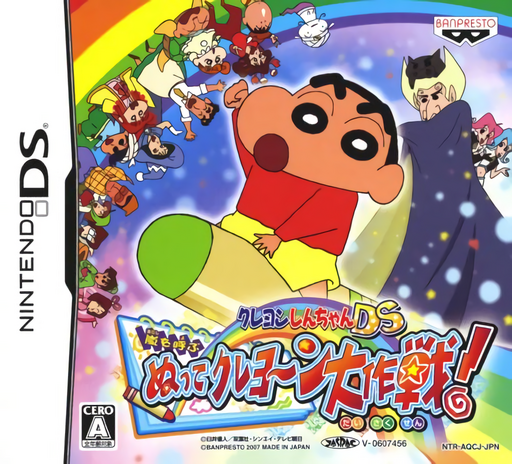
Crayon Shin-chan DS - Arashi o Yobu Nutte Crayoon Daisakusen!
Play Crayon Shin-chan DS - Arashi o Yobu Nutte Crayoon Daisakusen! online. Color marked scenery and change costumes to open Shin-chan's paths. See the Nintendo DS starting guide and controls.
Browser play
Nintendo DS (NDS) — EmulatorJS controls
Default Player 1 keyboard mapping. Change keys in Controller Settings.
| Console button | Keyboard |
|---|---|
| ↑ / ↓ / ← / → | ↑ / ↓ / ← / → |
| A / B / X / Y | Z / X / A / S |
| L / R | Q / E |
| START / SELECT | Enter / V |
| Microphone | Not assigned |
Open Controller Settings to configure your keyboard or gamepad. Touch controls are available on mobile.
How to Play Crayon Shin-chan DS - Arashi o Yobu Nutte Crayoon Daisakusen!
Quick start
Learn movement and jumping in the opening stage. At the first crayon cue, use the lower screen to color the indicated feature, then return to the action above.
Controls
D-pad moves, B jumps and Y or A attacks. Use the touch screen for crayon colors and costume changes. Watch the crayon cue and follow the current costume's instructions.
Crayon Shin-chan DS - Arashi o Yobu Nutte Crayoon Daisakusen! — About this game
Nutte Crayoon Daisakusen mixes platforming on the upper screen with crayon and transformation actions below. When a crayon cue appears, the right color can alter an obstruction or create a way forward. Costumes bring their own attacks and movement, so a blocked path may call for a different form rather than a longer jump. Begin by learning normal movement, then inspect the first marked scene and try its color interaction. Revisit the costume explanation when a new form arrives; alternate exits and collectible rewards give reasons to look beyond the most obvious route.
Crayon Shin-chan DS - Arashi o Yobu Nutte Crayoon Daisakusen! Game manuals
Cheats
No cheats have been added for this edition.
Player verification and sources
Browser play was reviewed before this edition was published in the catalogue. The date below is the catalogue publication date, not the game’s original release date.
- Browser test and catalogue publication date
- Browsers and devices
- PC: Chrome, Edge and Firefox. Mobile: Chrome on Android and Safari on iPhone and iPad.
- Player engine and core
- EmulatorJS 4.3.0-pre · nds
- Tested by
- rwEmulator
Sources and editorial basis
rwEmulator reviews edition metadata, release information, game manuals and first-hand browser-play notes. Available manuals are linked below; the editorial policy explains how facts are checked and corrections are handled.