More browsing paths
Play Croc (US_EU edition · English) Online
Croc
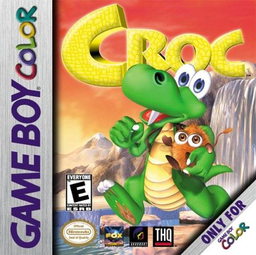
Play Croc online on Game Boy Color. Rescue Croc's Gobbo friends from Baron Dante in a colourful platform adventure. Jump across hazards, spin the tail at enemies and explore the route for captives rather than rushing straight past every side path.
Browser play
Game Boy Color (GBC) — EmulatorJS controls
Default Player 1 keyboard mapping. Change keys in Controller Settings.
| Console button | Keyboard |
|---|---|
| ↑ / ↓ / ← / → | ↑ / ↓ / ← / → |
| A / B | Z / X |
| START / SELECT | Enter / V |
Open Controller Settings to configure your keyboard or gamepad. Touch controls are available on mobile.
How to Play Croc
Quick start
Choose Start Game, learn a short jump and tail spin and inspect the first route for a Gobbo. Practise a controlled run before crossing a longer gap.
Controls
Left/Right move, Up climbs and Down ducks/climbs down. A jumps, A then A stomps, B tail-spins and hold B+direction runs. START pauses. Swimming uses D-pad and B; sub-games use B confirmation and A for designated target actions.
Croc — About this game
Begin with a jump and tail spin, then practise running while holding B with a direction. A second A during a jump makes a stomp. When the scene goes underwater, use directional swimming and B tail spin; read separate sub-game instructions because their confirmation button differs.
Croc Game manuals
Cheats
No cheats have been added for this edition.
Player verification and sources
Browser play was reviewed before this edition was published in the catalogue. The date below is the catalogue publication date, not the game’s original release date.
- Browser test and catalogue publication date
- Browsers and devices
- PC: Chrome, Edge and Firefox. Mobile: Chrome on Android and Safari on iPhone and iPad.
- Player engine and core
- EmulatorJS 4.3.0-pre · gb
- Tested by
- rwEmulator
Sources and editorial basis
rwEmulator reviews edition metadata, release information, game manuals and first-hand browser-play notes. Available manuals are linked below; the editorial policy explains how facts are checked and corrections are handled.