More browsing paths
Play Cruis'n Exotica (US edition · English) Online
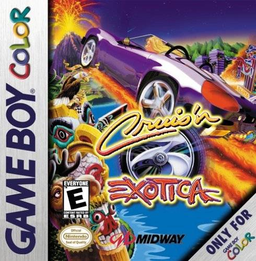
Cruis'n Exotica
Play Cruis'n Exotica online on Game Boy Color. Race through checkpoints before time expires in Cruis'n Exotica. Freestyle opens tracks for practice, Exotica demands first place to advance and Circuit uses race points to open further routes.
Browser play
Game Boy Color (GBC) — EmulatorJS controls
Default Player 1 keyboard mapping. Change keys in Controller Settings.
| Console button | Keyboard |
|---|---|
| ↑ / ↓ / ← / → | ↑ / ↓ / ← / → |
| A / B | Z / X |
| START / SELECT | Enter / V |
Open Controller Settings to configure your keyboard or gamepad. Touch controls are available on mobile.
How to Play Cruis'n Exotica
Quick start
Choose Freestyle, a track and car, then practise A acceleration and B braking before the first bend. Learn checkpoint placement before taking on Exotica progression.
Controls
D-pad steers and navigates, A accelerates, B brakes, START pauses and SELECT changes view. Menus use Up/Down and A; Left/Right changes options. Passwords are supplied at mileage milestones or car unlocks.
Cruis'n Exotica — About this game
Begin in Freestyle to learn a car's turning and braking. Passing a checkpoint adds time, so a reliable line matters as much as an early lead. Compare car statistics, change the view if helpful and keep the passwords given as mileage grows or another car is unlocked.
Cruis'n Exotica Game manuals
Cheats
No cheats have been added for this edition.
Player verification and sources
Browser play was reviewed before this edition was published in the catalogue. The date below is the catalogue publication date, not the game’s original release date.
- Browser test and catalogue publication date
- Browsers and devices
- PC: Chrome, Edge and Firefox. Mobile: Chrome on Android and Safari on iPhone and iPad.
- Player engine and core
- EmulatorJS 4.3.0-pre · gb
- Tested by
- rwEmulator
Sources and editorial basis
rwEmulator reviews edition metadata, release information, game manuals and first-hand browser-play notes. Available manuals are linked below; the editorial policy explains how facts are checked and corrections are handled.