More browsing paths
Play Deer Hunter (US edition · English) Online
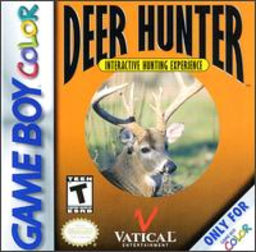
Deer Hunter
Play Deer Hunter online on GBC. Plan a hunt from an overhead map, read signs of deer activity and choose a viewing spot in this GBC hunting simulation.
Browser play
Game Boy Color (GBC) — EmulatorJS controls
Default Player 1 keyboard mapping. Change keys in Controller Settings.
| Console button | Keyboard |
|---|---|
| ↑ / ↓ / ← / → | ↑ / ↓ / ← / → |
| A / B | Z / X |
| START / SELECT | Enter / V |
Open Controller Settings to configure your keyboard or gamepad. Touch controls are available on mobile.
How to Play Deer Hunter
Quick start
Set equipment and a location, start New Hunt and move the map marker to a promising sign of activity.
Controls
D-pad moves the map cursor; A moves there and enters hunting view. Left/right scans the scene. Hold B with left/right to choose a status icon, then A uses it; A exits binocular view.
Deer Hunter — About this game
Choose your equipment and region before starting. On the map, check evidence such as bedding areas or rub marks instead of moving at random. Enter the hunting view, scan left and right and use binoculars to inspect farther away. Compare how concealment and a chosen viewing position affect what you can observe before attempting a shot.
Deer Hunter Game manuals
Cheats
No cheats have been added for this edition.
Player verification and sources
Browser play was reviewed before this edition was published in the catalogue. The date below is the catalogue publication date, not the game’s original release date.
- Browser test and catalogue publication date
- Browsers and devices
- PC: Chrome, Edge and Firefox. Mobile: Chrome on Android and Safari on iPhone and iPad.
- Player engine and core
- EmulatorJS 4.3.0-pre · gb
- Tested by
- rwEmulator
Sources and editorial basis
rwEmulator reviews edition metadata, release information, game manuals and first-hand browser-play notes. Available manuals are linked below; the editorial policy explains how facts are checked and corrections are handled.