More browsing paths
Play Doug's Big Game (France edition · French) Online
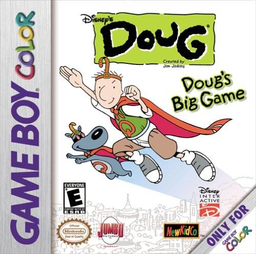
Doug - La Grande Aventure
Play Doug's Big Game online on GBC. Explore Bluffington, follow clues and help Doug find Patti.
Browser play
Game Boy Color (GBC) — EmulatorJS controls
Default Player 1 keyboard mapping. Change keys in Controller Settings.
| Console button | Keyboard |
|---|---|
| ↑ / ↓ / ← / → | ↑ / ↓ / ← / → |
| A / B | Z / X |
| START / SELECT | Enter / V |
Open Controller Settings to configure your keyboard or gamepad. Touch controls are available on mobile.
How to Play Doug's Big Game
Quick start
Start a new game and explore the opening area. Use the directional pad to move, approach a character and press A to talk or interact. Read the request, look around nearby paths and return when you have what the character needs.
Controls
The directional pad moves Doug and selects menu entries. A talks, interacts or confirms; B returns from a choice. START opens the menu.
Doug's Big Game — About this game
Move between locations and check with the characters you meet before rushing onward. A conversation can point to another person or a missing object, so keep the current task in mind as you explore. Return to a familiar place when you have the requested item or information; a short detour can be the step that advances Doug’s day.
Cheats
No cheats have been added for this edition.
Player verification and sources
Browser play was reviewed before this edition was published in the catalogue. The date below is the catalogue publication date, not the game’s original release date.
- Browser test and catalogue publication date
- Browsers and devices
- PC: Chrome, Edge and Firefox. Mobile: Chrome on Android and Safari on iPhone and iPad.
- Player engine and core
- EmulatorJS 4.3.0-pre · gb
- Tested by
- rwEmulator
Sources and editorial basis
rwEmulator reviews edition metadata, release information, game manuals and first-hand browser-play notes. Available manuals are linked below; the editorial policy explains how facts are checked and corrections are handled.